A lightweight, browser-based code snippet studio for turning plain code into polished,
shareable screenshots - with live syntax highlighting, themes, fonts, plus export.



Created by Bilal Malik
Follow on Github bilalmlkdev
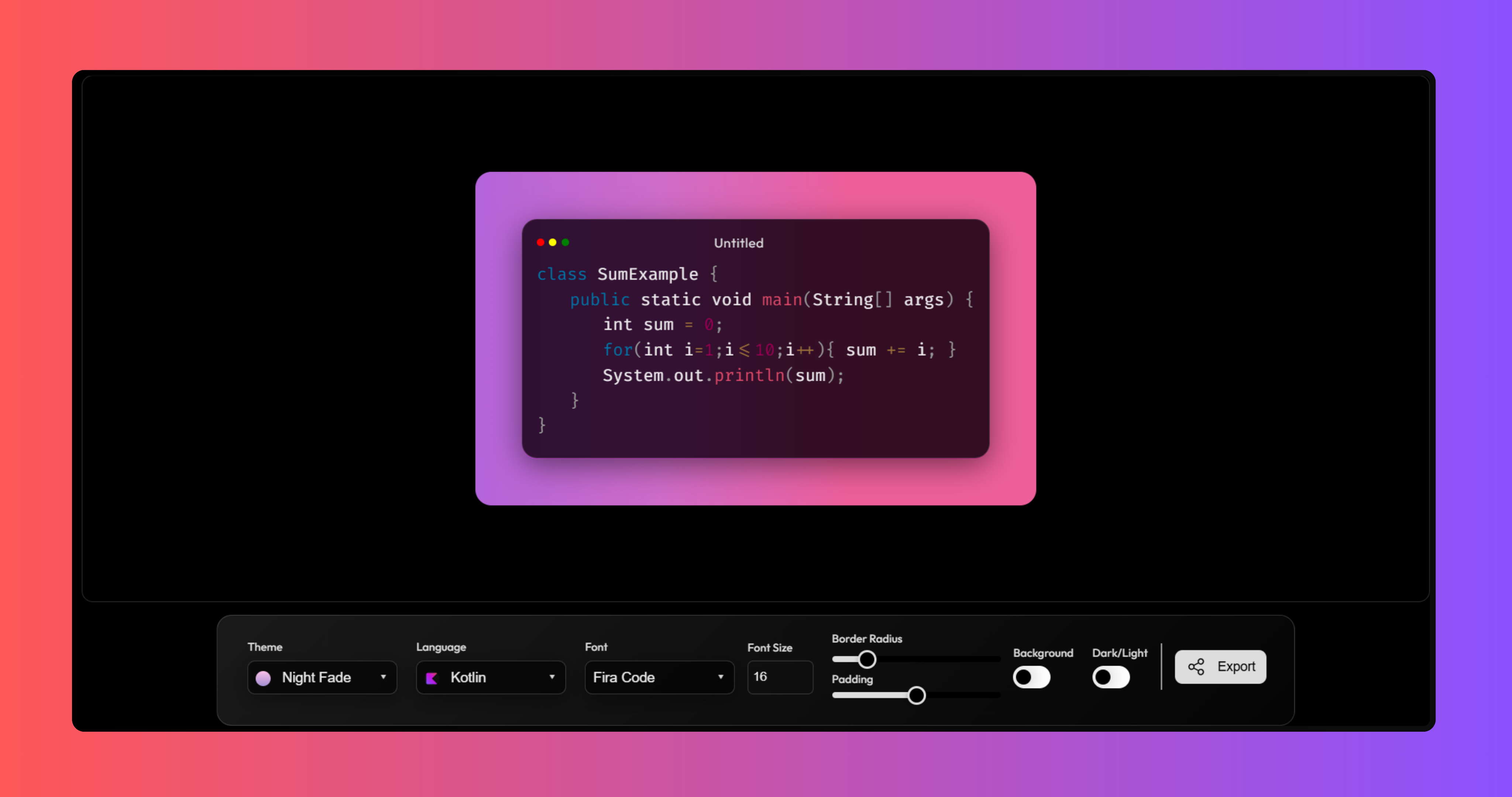
SnippitKit is a lightweight web tool for producing polished code screenshots and shareable code templates. Paste or type code, pick a language for Prism.js highlighting, choose a theme and font, and fine-tune padding, border radius, and font size - then export as a clean PNG or SVG, or copy it straight to your clipboard.
There's no backend, no build pipeline, and no account. Everything - the editor, the highlighting, the themes, the export - runs entirely in the browser. Open index.html, paste your code, and you have a shareable image in seconds.
It's built for developers who want a fast way to produce nice-looking code snippets for documentation, blog posts, tutorials, or social media, without reaching for a full design tool.
| Category | Highlights |
|---|---|
| Live Editor | Type or paste code directly, with real-time Prism.js syntax highlighting as you go |
| Language Support | Kotlin, JavaScript, TypeScript, Python, Java, C, C++, C#, Go, Rust, PHP, Ruby, Swift, SQL, HTML, CSS, SCSS, Bash, JSON, YAML, XML, Markdown, and more |
| Automatic Detection | Falls back to lightweight pattern-based language detection when no language is manually selected |
| Themes | A curated set of gradient backgrounds, selectable from a searchable, keyboard-accessible dropdown |
| Fonts | Dynamically loaded Google Fonts, swapped live without a page reload |
| Layout Controls | Adjustable padding, border radius, and font size via live-updating range/number inputs |
| Background Toggle | Switch the panel background on or off for a transparent export |
| Dark / Light Mode | Toggle the code panel between dark and light presentation |
| Export | Download as high-quality PNG or SVG |
| Clipboard Support | Copy the rendered image or a PNG data URL directly to your clipboard (requires HTTPS) |
| JSON-Driven Config | Themes, fonts, and languages are all defined in plain JSON - no code changes needed to add new ones |
| Accessible UI | Custom dropdowns with proper ARIA roles, full keyboard navigation, and focus handling |
SnippitKit is intentionally framework-free - plain HTML, CSS, and JavaScript, split into a small number of focused files rather than a component tree.
The editing surface is a two-layer overlay. A transparent <textarea> sits on top of a <pre><code> block. The textarea captures every keystroke, selection, undo/redo, and paste event natively; the <pre><code> block underneath mirrors its value on every input and gets re-highlighted by Prism.js. A single contenteditable element would make the cursor jump every time Prism rewrites the HTML - the overlay avoids that while keeping typing feel completely native.
Themes, fonts, and languages are data, not code. Each is a plain array of objects in data/themes.json, data/languages.json, and data/fonts.json. On load, script.js fetches all three and generates each dropdown's markup from that data. Adding a new option is a JSON edit, not a JavaScript change.
Export is handled separately. export.js is a standalone file that captures the rendered panel with dom-to-image-more and turns it into a downloadable PNG/SVG or a clipboard write - kept out of the editor script so each file focuses on one job.
All three are single JSON entries - no JavaScript changes required.
Theme - add to data/themes.json:
{ "id": "sunset-glow", "label": "Sunset Glow", "gradient": "linear-gradient(120deg, #ff512f 0%, #f09819 100%)", "icon": "/assets/theme-pngs/017 Sunset Glow.png" }gradient accepts any valid CSS background value. icon is optional - omit or set null without a thumbnail.
Language - add to data/languages.json:
{ "id": "dart", "label": "Dart", "prismClass": "language-dart", "icon": "https://cdn.jsdelivr.net/gh/devicons/devicon/icons/dart/dart-original.svg" }prismClass must match a real Prism.js component name so the autoloader can fetch the grammar.
Font - add to data/fonts.json:
{ "id": "victor-mono", "name": "Victor Mono", "fallback": "monospace", "weights": [400] }name must exactly match the font's name on Google Fonts, since it builds the dynamic stylesheet request.
Once added, each new option appears in its dropdown automatically and behaves exactly like a built-in one.
snippitkit
├── assets
│   ├── favicon
│   └── theme-pngs
├── data
│   ├── themes.json
│   ├── languages.json
│   └── fonts.json
├── styles
│   └── style.css
├── js
│   ├── script.js         editor logic: sync, detection, selects, live controls
│   └── export.js         export logic: PNG/SVG, copy image, copy data URL
├── index.html
├── package.json
├── vercel.json
└── LICENSE
| Principle | Description |
|---|---|
| No Build Step Required | The app runs directly from static files - no bundler needed to develop or deploy |
| Data-Driven UI | Themes, languages, and fonts are generated from JSON, not hardcoded into markup |
| Native Input First | Real browser inputs (textarea, range, number) are used instead of reimplementing them |
| Separation of Concerns | Editing and export logic live in separate files with no shared state beyond the DOM |
| Accessible by Default | Custom controls follow ARIA combobox/listbox patterns with full keyboard support |
SnippitKit is built from a small, deliberate set of tools - each covering one job.







- A modern browser - Chrome, Edge, Firefox, or Safari
- Optionally a local static server (Live Server,
npx serve) -fetch()for the JSON data is blocked onfile://URLs
Clone the repository and move into it.
git clone https://github.com/bilalmlkdev/snippitkit.git
cd snippitkit
Serve the project with any static file server. With the VS Code Live Server extension, right-click index.html and select Open with Live Server. Or with Node:
npx serve .Then open the local address shown in your terminal.
- Open the app in your browser.
- Paste or type code into the editor.
- Choose a Language to apply Prism highlighting, or let auto-detection handle it.
- Pick a Theme to change the background gradient.
- Select a Font to load a Google Font dynamically.
- Adjust Font Size, Padding, and Border Radius to style the output.
- Toggle Background and Dark/Light for different looks.
- Click Export to open PNG/SVG download and copy options - double-click it to copy raw code text instead.
Keyboard users: arrow keys + Enter navigate custom selects, Escape closes a menu. Empty theme/font dropdowns usually mean you opened index.html directly - serve it locally instead, since JSON fetch() is blocked on file://.
Contributions of every size are welcome. The fastest way to contribute a theme, language, or font is a single JSON entry as described above under Architecture - no other code changes required.
- Fork the repository
- Create a feature branch
- Make your changes
- Open a pull request describing what changed and why
This project is licensed under the MIT License.
MIT License

Copyright (c) 2026 Bilal Malik

Permission is hereby granted, free of charge, to any person obtaining a copy
of this software and associated documentation files (the "Software"), to deal
in the Software without restriction, including without limitation the rights
to use, copy, modify, merge, publish, distribute, sublicense, and/or sell copies
of the Software. The above copyright notice and this permission notice shall
be included in all copies or substantial portions of the Software.

THE SOFTWARE IS PROVIDED "AS IS", WITHOUT WARRANTY OF ANY KIND, EXPRESS OR
IMPLIED, INCLUDING BUT NOT LIMITED TO THE WARRANTIES OF MERCHANTABILITY,
FITNESS FOR A PARTICULAR PURPOSE AND NONINFRINGEMENT. IN NO EVENT SHALL THE
AUTHORS OR COPYRIGHT HOLDERS BE LIABLE FOR ANY CLAIM, DAMAGES OR OTHER
LIABILITY, WHETHER IN AN ACTION OF CONTRACT, TORT OR OTHERWISE, ARISING FROM
OUT OF OR IN CONNECTION WITH THE SOFTWARE OR THE USE OR OTHER DEALINGS IN THE
SOFTWARE.