CodeIgniter is a PHP full-stack web framework that is light, fast, flexible, and secure. GridPHP is a powerful datagrid component for PHP applications.
This repository provides an official, composer-installable application starter pre-configured for integrating GridPHP with CodeIgniter 4. It simplifies datagrid setup by automatically handling assets publishing, sample SQLite database configuration in .env file and sample master-detail datagrid integration out of the box.
For more information, see:
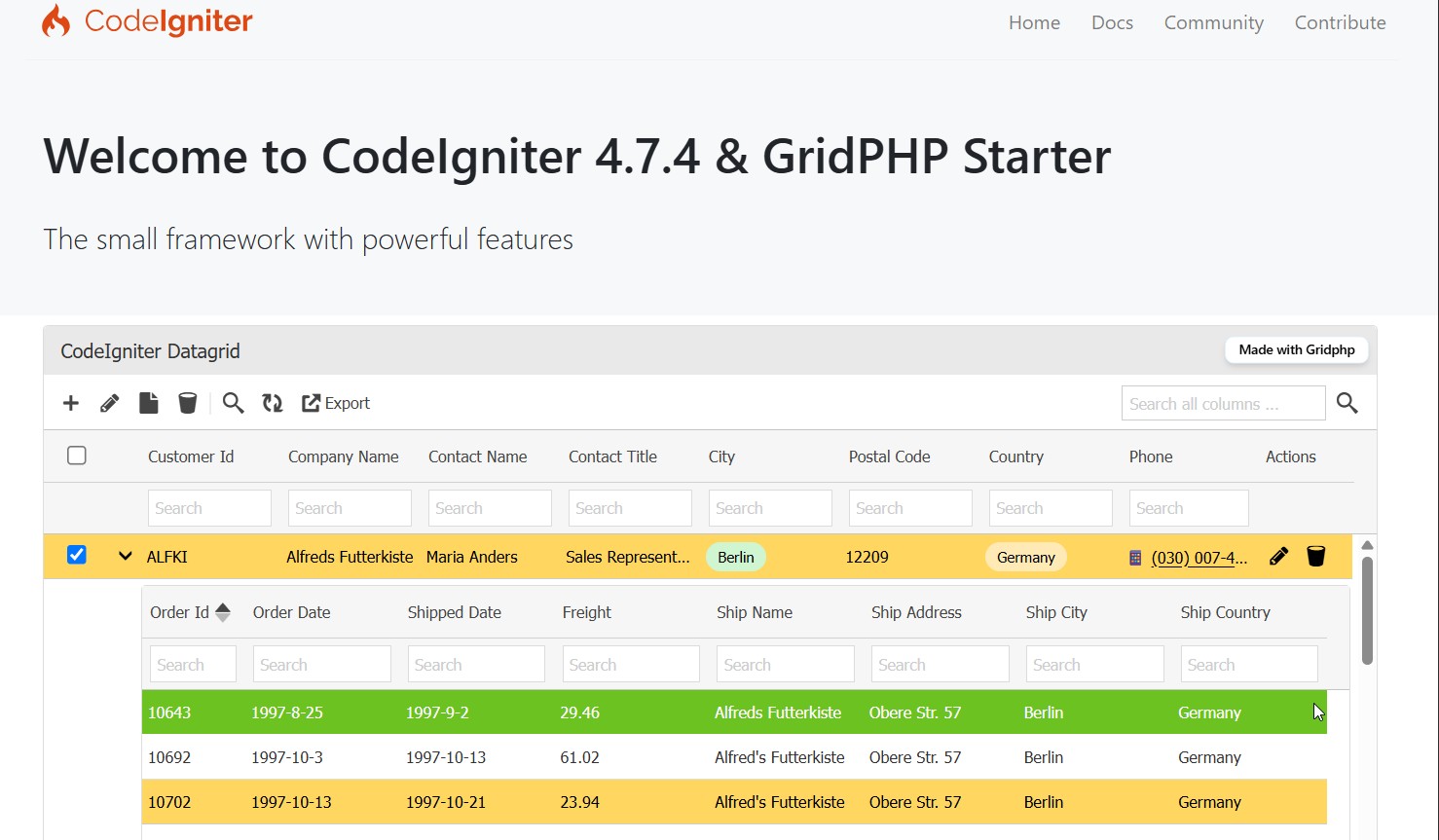
Run create-project to create a new project:
composer create-project gridphp/ci4-starter my-app
cd my-app
composer create-project automatically runs setup scripts that copy env → .env, fetch core GridPHP files, and publish front-end assets to public/gridphp/assets/.
Whenever there is a new release of CodeIgniter 4 or GridPHP, run:
composer updateWhen updating, check the CodeIgniter release notes to see if there are any changes you might need to apply to your app folder. The affected files can be copied or merged from vendor/codeigniter4/framework/app.
-
Initial Configuration (
app.baseURL& Environment): Open.env(automatically generated duringcomposer create-project). Refer to CodeIgniter's Initial Configuration Guide for setup instructions:- Base URL: When publishing live, ensure you set
app.baseURLto your domain URL (e.g.,app.baseURL = 'https://example.com/'). For local development, by default it is set toapp.baseURL = 'http://localhost:8080/'. This ensuresbase_url()properly generates asset links for GridPHP JS/CSS files. - Environment: Set
CI_ENVIRONMENT = developmentwhile developing for debugging, and switch toCI_ENVIRONMENT = productionwhen deploying live.
- Base URL: When publishing live, ensure you set
-
Database Configuration:
.envis automatically created duringcomposer create-project. GridPHP automatically connects using your CodeIgniter database configuration (app/Config/Database.phpor.env).- By default, the database configuration is set to SQLite database in
.env, it will use bundled SQLite sample database containing samplecustomers,ordersand other tables.database.default.hostname = database.default.database = ./writable/db/database.db database.default.username = database.default.password = database.default.DBDriver = SQLite3
- To connect to MySQL / MariaDB, edit your
.env:database.default.hostname = localhost database.default.database = my_database database.default.username = root database.default.password = secret database.default.DBDriver = MySQLi
- By default, the database configuration is set to SQLite database in
-
Publish GridPHP Assets (Automated): Composer automatically copies GridPHP JS & CSS assets into
public/gridphp/assets/during install/update. You can manually run it anytime:composer run gridphp:publish
-
Run Local Server:
php spark serve
Visit
http://localhost:8080in your browser.
Below are step-by-step walkthroughs demonstrating how to build a basic single-table grid ("Hello World") and an advanced Master-Detail grid.
This walkthrough creates a simple, zero-configuration datagrid bound directly to a database table with no extra bells and whistles.
namespace App\Controllers;

class Home extends BaseController
{
    public function index(): string
    {
        // Initialize GridPHP with CI4 database config
        $g = new \jqgrid(config('GridPHP')->dbconf());

        // Set table name
        $g->table = 'customers';

        // Render grid HTML and JavaScript snippet
        $data['output'] = $g->render('my_first_grid');

        // Pass output to view
        return view('hello_grid', $data);
    }
}Include GridPHP scripts/styles in your view header and output $output:
<!DOCTYPE html>
<html lang="en">
<head>
    <meta charset="UTF-8">
    <title>Hello World Grid</title>

    <!-- GridPHP Assets -->
    <link rel="stylesheet" type="text/css" media="screen" href="<?= base_url('gridphp/assets/themes/base/jquery-ui.custom.css') ?>">
    <link rel="stylesheet" type="text/css" media="screen" href="<?= base_url('gridphp/assets/jqgrid/css/ui.jqgrid.css') ?>">

    <script src="<?= base_url('gridphp/assets/jquery.min.js') ?>"></script>
    <script src="<?= base_url('gridphp/assets/jqgrid/js/i18n/grid.locale-en.js') ?>"></script>
    <script src="<?= base_url('gridphp/assets/themes/jquery-ui.custom.min.js') ?>"></script>
    <script src="<?= base_url('gridphp/assets/jqgrid/js/jquery.jqGrid.min.js') ?>"></script>
</head>
<body>

    <div style="margin: 20px;">
        <h2>Hello World Datagrid</h2>
        <?= $output ?>
    </div>

</body>
</html>This walkthrough demonstrates a feature-rich Master Grid linked to a Detail Subgrid via an AJAX endpoint.
namespace App\Controllers;

class Home extends BaseController
{
    // Master Grid Page
    public function index(): string
    {
        $g = new \jqgrid(config('GridPHP')->dbconf());

        // Configure Master Grid Options
        $g->set_options([
            'caption'     => 'Customer Directory (Master)',
            'multiselect' => true,
            'subGrid'     => true,
            'subgridurl'  => 'detail', // Subgrid AJAX endpoint
        ]);

        $g->table = 'customers';
        $g->select_command = 'SELECT customer_id, company_name, contact_name, city, country FROM customers';

        // Column Formatters
        $g->set_columns([
            ['name' => 'country', 'formatter' => 'badge'],
            ['name' => 'city',    'formatter' => 'badge'],
        ], true);

        // Actions: Export, Edit, Delete
        $g->set_actions([
            'export' => true,
            'add'    => true,
            'edit'   => true,
            'delete' => true,
        ]);

        $data['output'] = $g->render('master_customers');

        return view('welcome_message', $data);
    }

    // Detail Subgrid Endpoint (AJAX payload)
    public function detail(): string
    {
        $g = new \jqgrid(config('GridPHP')->dbconf());

        $g->set_options([
            'caption'  => '',
            'readonly' => true,
            'toolbar'  => 'bottom',
        ]);

        $g->table = 'orders';

        // Filter detail records by rowid passed from parent row
        $customerId = $this->request->getGet('rowid') ?? '';
        $g->select_command = "SELECT order_id, order_date, shipped_date, freight, ship_name FROM orders WHERE customer_id = '{$customerId}'";

        // Return raw rendered subgrid for AJAX injection
        return $g->render('detail_orders');
    }
}Ensure routes are registered both get and post for master and detail endpoint:
// for fetching data
$routes->get('/', 'Home::index');
$routes->get('detail', 'Home::detail');

// for CRUD operations
$routes->post('/', 'Home::index');
$routes->post('detail', 'Home::detail');<!DOCTYPE html>
<html lang="en">
<head>
<meta charset="UTF-8">
<title>Master-Detail Grid</title>
<!-- GridPHP CSS & JS Assets -->
<link rel="stylesheet" type="text/css" media="screen" href="<?= base_url('gridphp/assets/themes/base/jquery-ui.custom.css') ?>">
<link rel="stylesheet" type="text/css" media="screen" href="<?= base_url('gridphp/assets/jqgrid/css/ui.jqgrid.css') ?>">
<script src="<?= base_url('gridphp/assets/jquery.min.js') ?>"></script>
<script src="<?= base_url('gridphp/assets/jqgrid/js/i18n/grid.locale-en.js') ?>"></script>
<script src="<?= base_url('gridphp/assets/themes/jquery-ui.custom.min.js') ?>"></script>
<script src="<?= base_url('gridphp/assets/jqgrid/js/jquery.jqGrid.min.js') ?>"></script>
</head>
<body>
<div class="container" style="padding: 20px;">
<h1>Master-Detail Datagrid</h1>
<?= $output ?>
</div>
</body>
</html>app/Config/GridPHP.php: Bridge configuration connecting CI4 database settings to GridPHP.app/Controllers/Home.php: Controller featuring master and detail grid methods.app/Views/welcome_message.php: View file loading GridPHP styles/scripts and displaying grid output.app/Config/Routes.php: Added routes for grid examples.writable/db/database.db: SQLite database for sample datapublic/gridphp/assets/: Published GridPHP front-end dependencies (JS, CSS, Themes).composer_script.php: Automated script for environment setup, file downloads, and asset publishing.
From the official doc:
- "Whoops! We seem to have hit a snag" → check write permissions for webuser on
writable/logs. - Make sure PHP's
intlandcurlextensions are installed (required by CodeIgniter 4). - SQLite path: make sure the
sqlite3PHP extension is enabled (php -m | grep sqlite).
- Scaffold & Starter Code: MIT License.
- CodeIgniter 4 Framework: MIT License.
- GridPHP Library: Subject to GridPHP licensing (Free / Commercial). See gridphp.com/compare for details.