Real-time human pose detection for React Native and Expo.
33 body landmarks per frame, detected and drawn entirely in the native layer, powered by MediaPipe. Works in Expo and bare React Native projects alike. Nothing crosses the bridge until you ask.



Installation · Quick start · Do more · API · Example · Docs
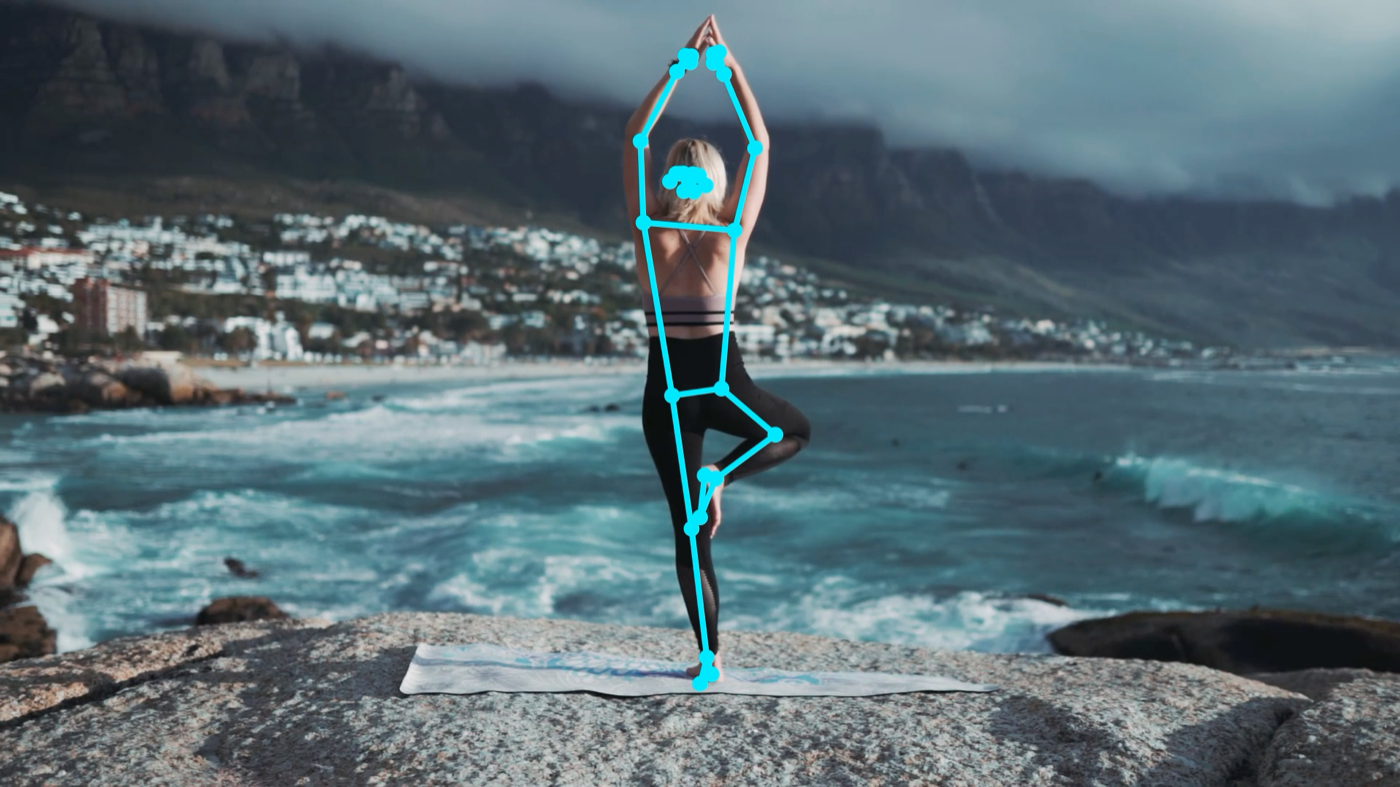
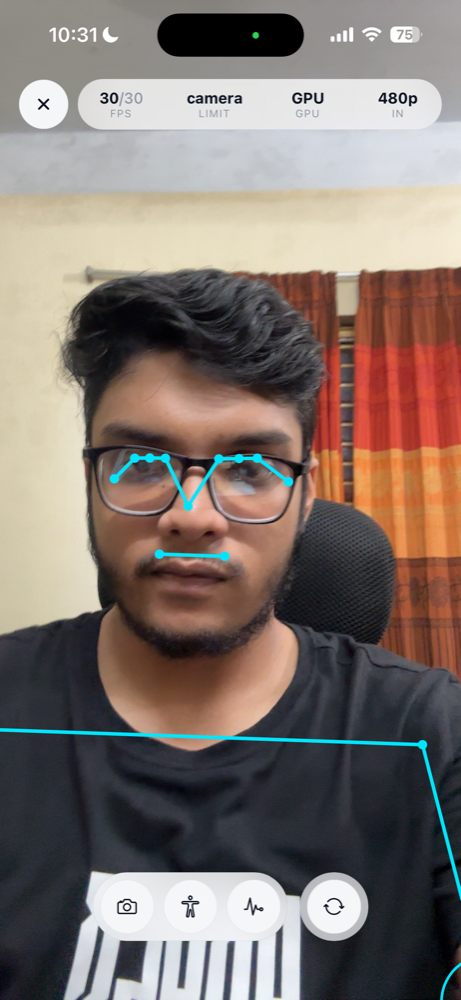
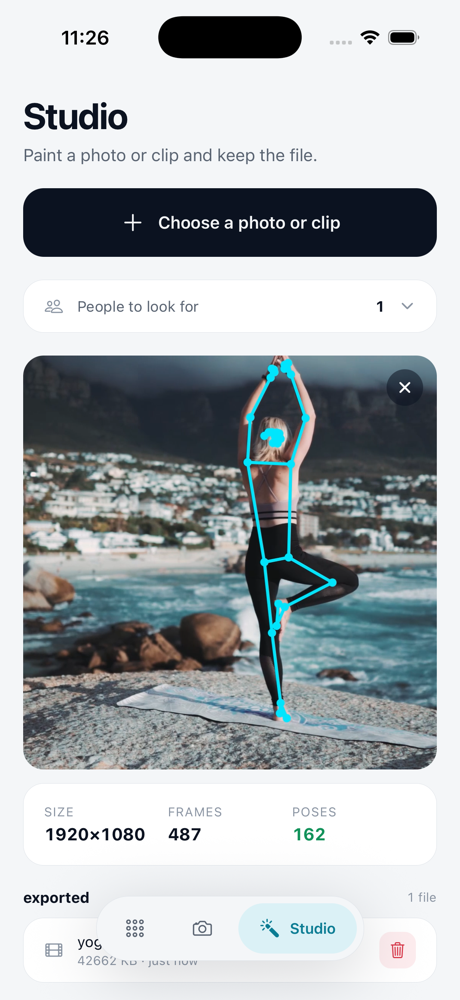
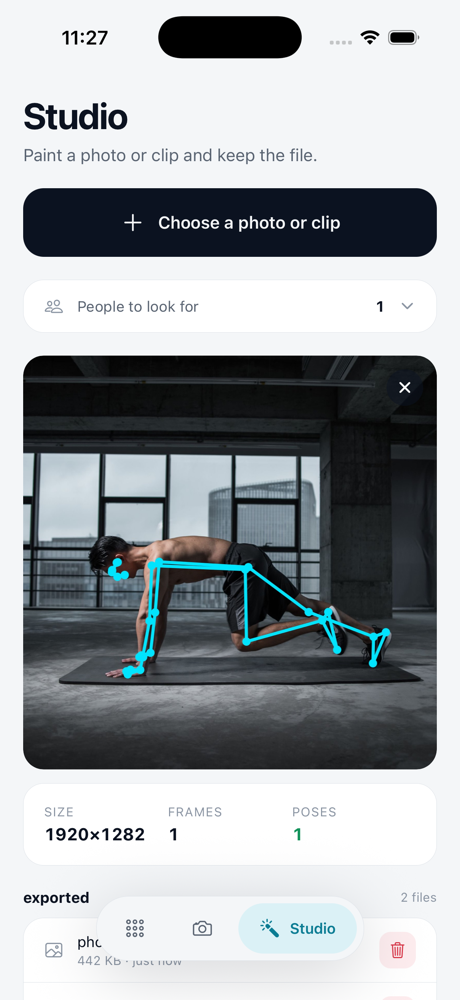
Snaps from the example app
- One component.
<PoseCamera />opens the camera, finds the body and draws the skeleton. - Joint angles built in. Knee, elbow, hip and more: twelve angles, measured and drawn natively.
- Native triggers. Rep counting runs on the camera thread; you get one event per rep.
- No bridge traffic by default. Landmarks reach JavaScript only when you ask for them.
- Tunes itself. 30 fps when the phone keeps up, backing off for heat, battery and an empty frame.
- Photos and videos too. Landmarks from files, or a copy with the skeleton painted in.
- Expo or bare, zero runtime dependencies. Models are downloaded and verified at build time.
| react-native-pose-detection | Expo SDK | React Native | iOS | Android |
|---|---|---|---|---|
| 0.2.x | 56 and later | 0.85 and later | 16.4 | 7.0 (API 24) |
Expo Go cannot load native code, so use a development build. The JavaScript is about 70 KB.
One package, two setups. Both end in the same place: the model inside your native projects and the camera permission declared.
npx expo install react-native-pose-detectionIn app.json, add the config plugin:
npx expo prebuildThe plugin installs the model into both native projects and writes the camera permission into
Info.plist and AndroidManifest.xml for you. Nothing downloads at runtime.
Expo Go is not supported: this package contains native code, so use a development build.
npm i react-native-pose-detection expo@56 # expo@57 on React Native 0.86
npx react-native-pose-detection fetch-model fullexpo provides the autolinking that links this Expo module; it does not make your app an Expo
app. Each Expo SDK is built for one React Native,
hence the pinned version. If your app already has expo, install the package alone: a
version named in the command replaces the one you have. An app that does not use Expo modules yet
wires that autolinking into its native projects once:
the steps.
If your app uses other Expo packages too, npx expo install --check checks each of them against
your SDK; doctor only compares expo with React Native.
Starting a new app? npx create-expo-app@latest MyApp --template bare-minimum skips that
wiring: it creates a bare app with Expo modules already set up, on the React Native the newest
Expo SDK is built for. The React Native CLI's default can have no SDK at all, since Expo skips
some versions, such as 0.87.
On iOS, set the deployment target to 16.4 in the Podfile and the Xcode target, and add the
camera permission to ios/<YourApp>/Info.plist:
<key>NSCameraUsageDescription</key>
<string>We use the camera to analyze your movement.</string>On Android, the camera permission comes from this package's own manifest.
Either setup can be verified with npx react-native-pose-detection doctor, which checks the
install, including the Expo SDK against React Native, and names anything missing. Every step,
including EAS and release builds:
installation guide.
Exactly one ships, whichever you pick. Changing it is one word in the config plus a rebuild.
| Model | Best for |
|---|---|
lite |
budget devices, the highest frame rates |
full (default) |
most apps: the accuracy and cost balance |
heavy |
accuracy-critical work on flagship hardware |
On a budget Android phone, ship lite: a Redmi Note 12 runs full at about 10 fps and lite
at about 15. Sizes and the full trade-off table:
app size.
App.tsx
import { PoseCamera, useCameraPermission } from 'react-native-pose-detection';
export default function App() {
const permission = useCameraPermission();
if (!permission.granted) return null;
return <PoseCamera style={{ flex: 1 }} />;
}That is a live camera with a tracked skeleton, tuned to the device, zero bridge traffic.
Count reps without streaming a single coordinate. The condition runs on the camera thread; you hear about it once per rep:
<PoseCamera
triggers={[
{
id: 'squat',
enter: { angle: 'leftKnee', below: 90 },
exit: { angle: 'leftKnee', above: 160 },
emit: 'cycle',
debounceMs: 300,
},
]}
onTrigger={(e) => setReps(e.count)}
/>Read landmarks when you actually want them, as typed arrays from one shared buffer:
<PoseCamera
data={{ mode: 'throttled', throttleMs: 100, angles: ['leftKnee'] }}
onPose={(frame) => {
// frame.landmarks is a Float32Array of [x, y, z, visibility] per joint
setKneeAngle(frame.angles?.leftKnee);
}}
/>Paint a photo or video into a full-quality copy, without slowing the live camera:
import { exportPose } from 'react-native-pose-detection';
const { uri } = await exportPose(videoUri, { directory: 'documents' }).result;The package measures inference on each phone and runs at the camera's 30 fps when the phone keeps
up with room to spare. Heat halves the rate and then pauses it, Low Power Mode caps it, and an
empty frame drops it to an idle search. getProfile() says why:
await cam.current?.getProfile();
// { phase: 'settled', tier: 'high',
// resolved: { delegate: 'GPU', targetFps: 30, preview: '1080p', analysis: '480p' },
// p50InferenceMs: 16.2, measuredFps: 30, limitedBy: 'camera', thermalState: 'nominal' }Override any axis with profile, targetFps, resolution, analysisResolution, delegate or
thermalPolicy.
Every prop on one component. All of them optional; an explicit value pins that axis and the rest stay automatic.
<PoseCamera
ref={cam}
style={{ flex: 1 }}
// camera
facing="front" // 'auto' | 'front' | 'back'
active={isFocused} // the whole session on/off
detection={true} // inference on/off; off parks the model
resolution="auto" // preview: '480p' | '720p' | '1080p'
// detection
maxPoses={1} // 1 to 5
minConfidence={0.6} // what counts as a body
smoothing="auto" // off for one pose, which MediaPipe smooths already
// performance
profile="auto" // 'efficient' | 'balanced' | 'quality' | 'unrestricted'
targetFps="auto" // a number replaces the governed rate
analysisResolution="auto" // what the model sees: '360p' | '480p' | '720p'
delegate="auto" // 'gpu' | 'cpu'
thermalPolicy="adaptive" // 'critical-only' | 'off'
// drawing, all native
overlay={{
color: '#00E5FF',
lineWidth: 3,
pointRadius: 4,
angles: [{ joint: 'leftKnee' }, { joint: 'rightKnee' }],
}}
// data out, off unless asked
data={{ mode: 'throttled', throttleMs: 100, select: ['leftKnee', 'rightKnee'] }}
triggers={[squatTrigger]}
logLevel="off"
// events
onReady={(e) => console.log(e.delegate, e.targetFps)}
onError={(e) => console.warn(e.code, e.message)}
onCameraChange={(e) => setFacing(e.facing)}
onPerformanceChange={(e) => console.log(e.reason, e.targetFps)}
onTrigger={(e) => setReps(e.count)}
onPose={(frame) => setFrame(frame)}
onLog={(entries) => entries.forEach((e) => console.log(e.message))}
/>| Prop | Default | What it does |
|---|---|---|
style |
none | View style; { flex: 1 } is the usual answer |
facing |
'auto' |
Which lens, 'front' or 'back'; auto prefers front |
active |
true |
Camera session on/off |
detection |
true |
Inference on/off; false stops it at once and frees the model after a minute |
overlay |
true |
The skeleton; boolean or a config object |
smoothing |
'auto' |
One Euro filter: off for one pose, on for several; boolean or { minCutoff, beta } |
maxPoses |
1 |
Detection ceiling, 1 to 5 |
minConfidence |
unset = auto | What counts as a body, 0.1 to 1; unset follows maxPoses: 0.6 for one person, 0.3 above |
profile |
'auto' |
Performance envelope: 'efficient' 'balanced' 'quality' 'unrestricted' |
targetFps |
'auto' |
Inference rate; a number replaces the governed rate, capped by the camera |
resolution |
'auto' |
Preview: '480p' '720p' '1080p' |
analysisResolution |
'auto' |
What the model sees: '360p' '480p' '720p' |
delegate |
'auto' |
Inference engine, 'gpu' or 'cpu'; auto probes and falls back |
thermalPolicy |
'adaptive' |
Heat response: 'critical-only' or 'off'; off never stops reporting |
data |
{ mode: 'off' } |
What crosses to JavaScript: 'throttled' 'batched' 'live' |
triggers |
[] |
Native conditions, validated at render |
logLevel |
'off' |
Diagnostics, 'error' through 'trace', global or per category |
onReady … onLog |
none | Callbacks: lifecycle, errors, performance, triggers, frames, logs |
Exact types, clamping rules and edge behavior:
<PoseCamera> reference.
| Callback | Fires | Carries |
|---|---|---|
onReady |
the camera is up and the model running or failed to start, once per session | delegate, model, targetFps, sizes |
onError |
something failed; fatal says whether the camera or detection stopped |
code, message, fatal |
onCameraChange |
a lens switch finished | facing |
onPerformanceChange |
the rate or the delegate moved, or heat or Low Power Mode changed | reason, targetFps, delegate, limitedBy |
onTrigger |
a trigger entered, exited or completed a cycle | id, phase, count, durationMs |
onPose |
a frame, with data.mode 'throttled' or 'live' |
a PoseFrame |
onPoseBatch |
frames, with data.mode: 'batched' |
PoseFrame[] |
onFramesDropped |
your frame handler fell behind | a count |
onLog |
diagnostic entries, while logging is on | LogEntry[] |
Every error code, and which ones stop the camera: error codes.
const cam = useRef<PoseCameraRef>(null);
// <PoseCamera ref={cam} />
await cam.current?.switchCamera();| Method | Does |
|---|---|
switchCamera(), setFacing(facing) |
flips the lens or picks one, resolving once the new one delivers |
pause(), resume() |
stops and restarts the camera session |
startDetection(), stopDetection() |
turns inference on and off with the preview still running |
setOverlayEnabled(enabled) |
shows or hides the skeleton |
setProfile(profile), getProfile() |
picks a performance profile; reads what was measured and why |
getState() |
facing, rate, delegate and more, synchronously |
snapshot() |
the current frame, whatever data.mode is |
Guarantees and edge cases: ref methods reference.
A trigger is a condition checked natively on every frame, sending one onTrigger event when it
starts or stops holding. Conditions read angle, landmarkX, landmarkY, velocityX,
velocityY or visibility, and combine with all and any; emit is 'enter', 'exit',
'cycle' or 'while'. Guide: triggers · every field:
trigger schema.
import { detectOnImage, exportPose, useCameraPermission } from 'react-native-pose-detection';| Function | Does |
|---|---|
detectOnImage(uri, options?) |
landmarks from a photo |
detectOnVideo(uri, options?) |
landmarks from a video, sampled and cancellable |
exportPose(uri, options?) |
a copy of a photo or video with the skeleton painted in |
useCameraPermission(options?) |
the camera permission as React state |
getCameraPermission(), requestCameraPermission() |
reads the permission, or asks for it |
validateTriggers(), assertValidTriggers() |
checks trigger configs before they render |
landmark(), isVisible() and the other accessors |
read one joint out of a PoseFrame |
setLogLevel(), addLogListener() |
the diagnostic log channel |
Every export on one page, constants included: functions reference.
Every guide is also on the searchable documentation site. Read them in this order:
| Guide | Covers |
|---|---|
| Getting started | Install, first camera, first data |
| Installation | Expo, bare RN, EAS, release builds |
| Camera control | Lenses, switching, pausing, lifecycle |
| Triggers | Count reps and detect positions natively |
| Data delivery | Landmarks in JavaScript, modes and their cost |
| Photos and video files | Landmarks from files, painted copies |
| What you can build | Worked triggers for squats, holds and jumps |
| Performance | Profiles, heat, battery, app size |
| Troubleshooting | Real problems, and the log channel |
| Reference | Covers |
|---|---|
<PoseCamera> props |
Every prop, its default and its range |
| Events | Every callback, its payload, every error code |
| Ref methods | switchCamera, snapshot, getProfile, … |
| Functions | Files, permission, validation, accessors, logging |
| Types | PoseFrame, joint names, the wire format |
| Trigger schema | Conditions, emit modes, validation rules |
| Camera permission | The four states, and why blocked is not denied |
| Config plugin | app.json options |
| CLI | fetch-model, doctor, clear-cache |
The example app runs all of it, once as an Expo app and once as a bare one.
- VisionCamera with an ML Kit pose plugin, such as
react-native-vision-camera-v3-pose-detection: a fit for an app already built on VisionCamera frame processors. You add a worklets runtime and draw the skeleton yourself, and the pose plugins were last published in 2024. @thinksys/react-native-mediapipe: MediaPipe in a native view, MIT licensed, the closest in approach to this one.- TensorFlow.js with
@tensorflow/tfjs-react-native: MoveNet or BlazePose from JavaScript over WebGL. Its React Native adapter has had no release since November 2023. - QuickPose: a commercial SDK with ready-made exercises and rep counting.
Issues and PRs are welcome, especially device reports from hardware we have not measured. Start with contributing.
MIT © khalid999devs
{
  "expo": {
    "plugins": [
      [
        "react-native-pose-detection",
        {
          "model": "full", // 'lite' | 'full' | 'heavy'
          "cameraPermissionText": "We use the camera to analyze your movement."
        }
      ]
    ]
  }
}