Turn a feeling, moment, or musical idea into a playlist you can play immediately in your browser.






Promptify is a full-stack AI music curator that turns plain natural-language prompts into playlists you can play immediately in the browser. Describe a mood, activity, place, era, or moment in your own words. Promptify handles song discovery, selection, and Spotify metadata lookup for you, so you do not have to search for songs manually or create a playlist in Spotify before listening.
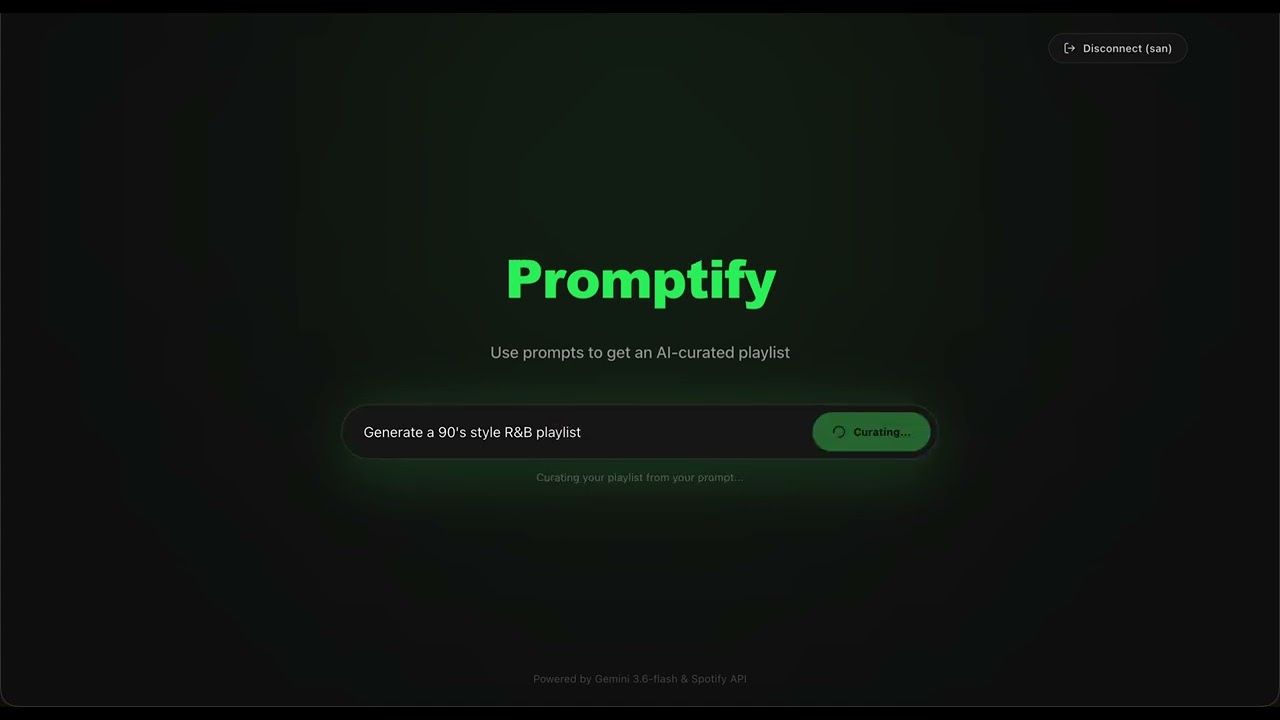
Select the thumbnail to play the demonstration on YouTube.
- Natural-language curation powered by Google Gemini for moods, moments, genres, eras, and activities.
- Playlist generation from plain English prompts without manual song-by-song searching.
- Instant browser playback without requiring users to create or save a Spotify playlist first.
- Real-track recommendations with structured playlist titles, descriptions, and song suggestions.
- Spotify metadata enrichment for album art, albums, artists, track links, Spotify URIs, durations, and previews.
- Spotify OAuth login with playlist modification permissions.
- Full-track playback through the Spotify Web Playback SDK for eligible Premium accounts.
- Sequential browser preview playback when full-track playback is unavailable.
- Responsive dark interface with Spotify-green accents.
- Audio previews using Spotify-provided preview URLs when available.
- Rotating prompt examples for inspiration while the prompt field is empty.
- Environment-based credential configuration protected by Git ignore rules.
- React 19
- TypeScript
- Vite
- Tailwind CSS 4
- Framer Motion
- Lucide React
- Python 3.10 or newer recommended
- FastAPI
- Uvicorn
- Pydantic
- python-dotenv
- httpx
- Google Gen AI Python SDK
- Google Gemini API for playlist ideation and structured JSON responses. The current backend model is
gemini-3.6-flash. - Spotify Web API for OAuth, catalog search, metadata, previews, and playlist creation.
- Node.js 20 or newer and npm
- Python 3.10 or newer recommended
- A Google Gemini API key
- A Spotify Developer application with a client ID, client secret, and redirect URI
Configure the Spotify application with this exact redirect URI:
http://127.0.0.1:5173/callback
Spotify treats localhost and 127.0.0.1 as different redirect URIs. The value in the Spotify Dashboard and the local environment file must match exactly.
Create backend/.env locally. Do not commit this file or place real credentials in documentation.
# Google Gemini
GEMINI_API_KEY=your_gemini_api_key_here

# Optional comma-separated keys for quota rotation
# GEMINI_API_KEYS=your_first_key_here,your_second_key_here

# Spotify Developer application
SPOTIFY_CLIENT_ID=your_spotify_client_id_here
SPOTIFY_CLIENT_SECRET=your_spotify_client_secret_here
SPOTIFY_REDIRECT_URI=http://127.0.0.1:5173/callback

# Optional backend port reference
PORT=8000
The repository ignore rules exclude environment files, private keys, credential files, virtual environments, caches, and build artifacts. If a secret is committed accidentally, revoke it immediately and remove it from Git history.
git clone <your-repository-url>
cd Promptifycd backend
python3 -m venv venv
source venv/bin/activate
python -m pip install --upgrade pip
python -m pip install -r requirements.txtCreate backend/.env using the template above, then start FastAPI:
uvicorn main:app --reload --host 127.0.0.1 --port 8000The API is available at http://127.0.0.1:8000. Interactive API documentation is available at http://127.0.0.1:8000/docs.
Open a second terminal from the repository root:
cd frontend
npm install
npm run dev
Open the Vite URL shown in the terminal, normally:
http://127.0.0.1:5173
For a production build:
npm run build
npm run previewflowchart LR
U[User] --> F[React and Vite frontend]
F -->|GET /api/auth/login| B[FastAPI backend]
B -->|OAuth authorization| S[Spotify Web API]
S -->|callback code| F
F -->|POST /api/auth/exchange| B
B -->|access token and profile| F
F -->|POST /api/generate| B
B -->|structured playlist request| G[Google Gemini API]
G -->|playlist ideas| B
B -->|track searches| S
S -->|metadata and preview URLs| B
B -->|enriched playlist JSON| F
F -->|POST /api/save-playlist| B
B -->|create playlist and add tracks| S
- The frontend requests a Spotify authorization URL from FastAPI.
- Spotify redirects the user to
/callbackwith an authorization code. - The frontend sends the code to FastAPI, which exchanges it with Spotify and returns the user profile and access token.
- The user submits a natural-language prompt to
POST /api/generate. - FastAPI asks Gemini for structured playlist ideas and searches Spotify for matching metadata.
- The frontend renders the enriched playlist and can play available previews or open Spotify links.
- FastAPI creates a Spotify playlist and adds valid track URIs when the user selects Open in Spotify.
| Method | Route | Purpose |
|---|---|---|
GET |
/ |
Health and status response |
GET |
/api/auth/login |
Returns the Spotify authorization URL |
POST |
/api/auth/exchange |
Exchanges a Spotify authorization code for user data |
POST |
/api/generate |
Generates and enriches a playlist from a prompt |
POST |
/api/save-playlist |
Creates a Spotify playlist and adds track URIs |
Run the frontend production build:
cd frontend
npm run build
Compile-check the backend:
cd backend
python -m py_compile main.py spotify_service.py- Keep Gemini and Spotify credentials in
backend/.envonly. - Do not add environment files, tokens, client secrets, private keys, or credential JSON files to Git.
- Use the narrowest Spotify scopes required by the application.
- Treat locally stored Spotify access tokens as sensitive.
- Configure a production CORS allowlist before deployment. The development backend currently allows all origins.
This project is intended to be released under the MIT License. Add a repository-level LICENSE file before publishing or distributing the project so the license badge is backed by the repository contents.