Repository navigation
feat(pages): show and edit grid pages of an application - #3215
rubenvdlinde wants to merge 21 commits into
Conversation


d05e9b5 to
844d24f
Compare

|
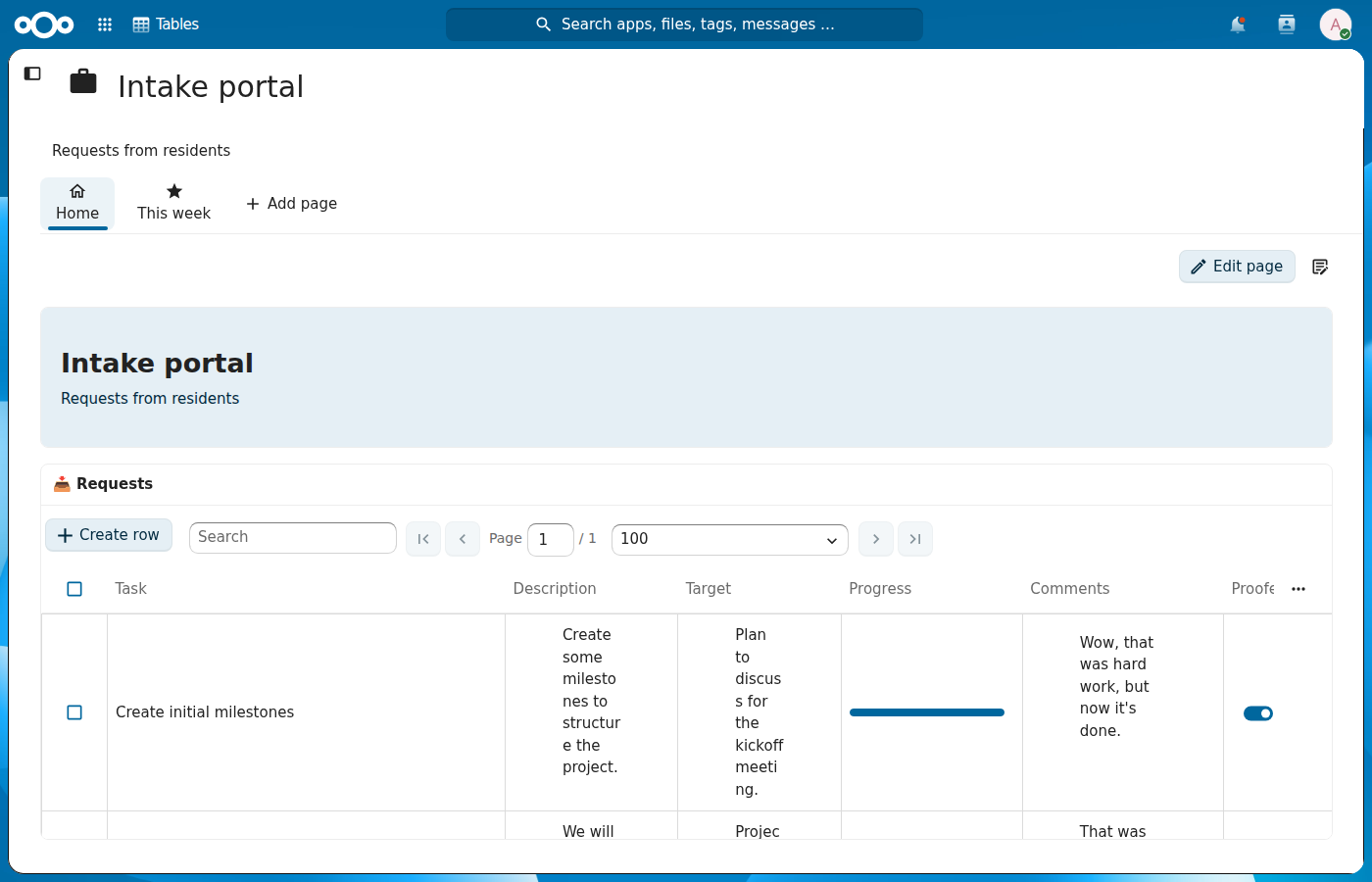
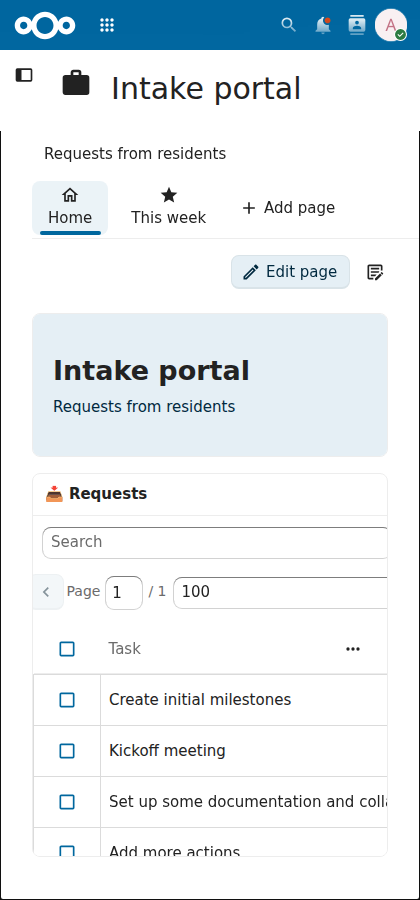
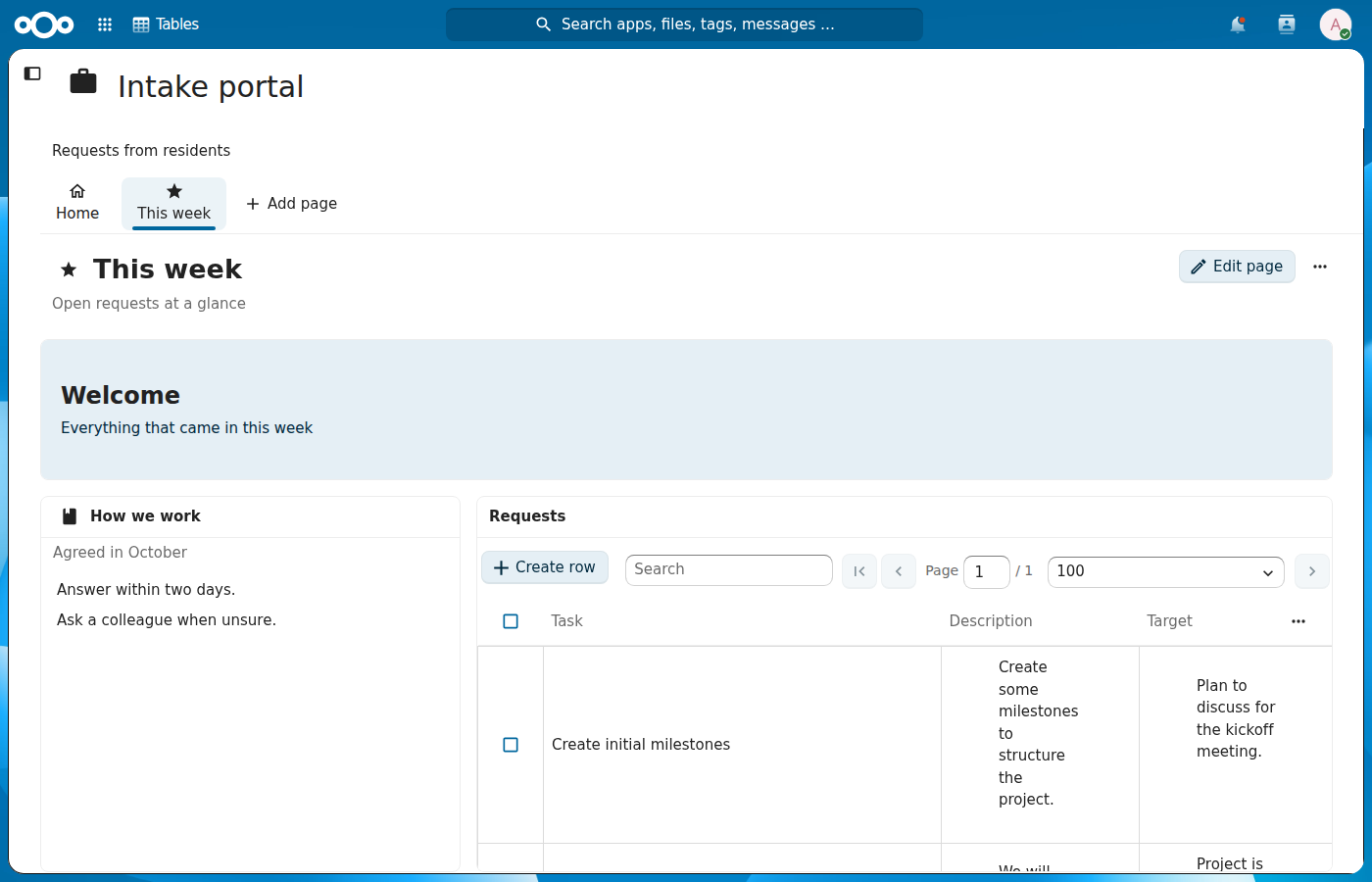
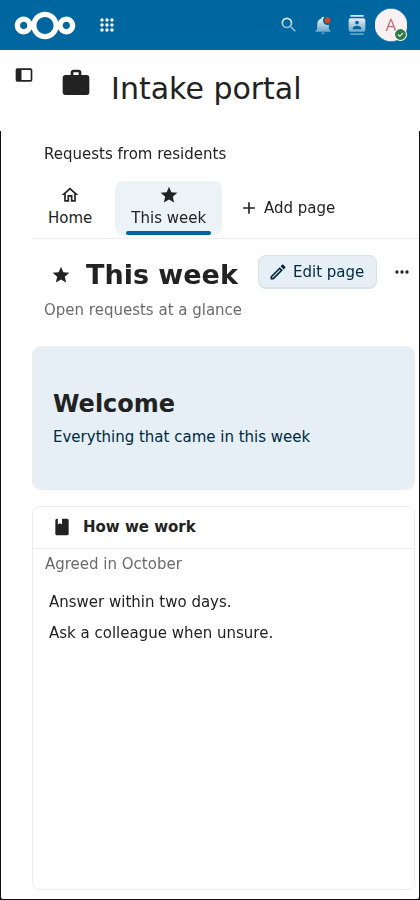
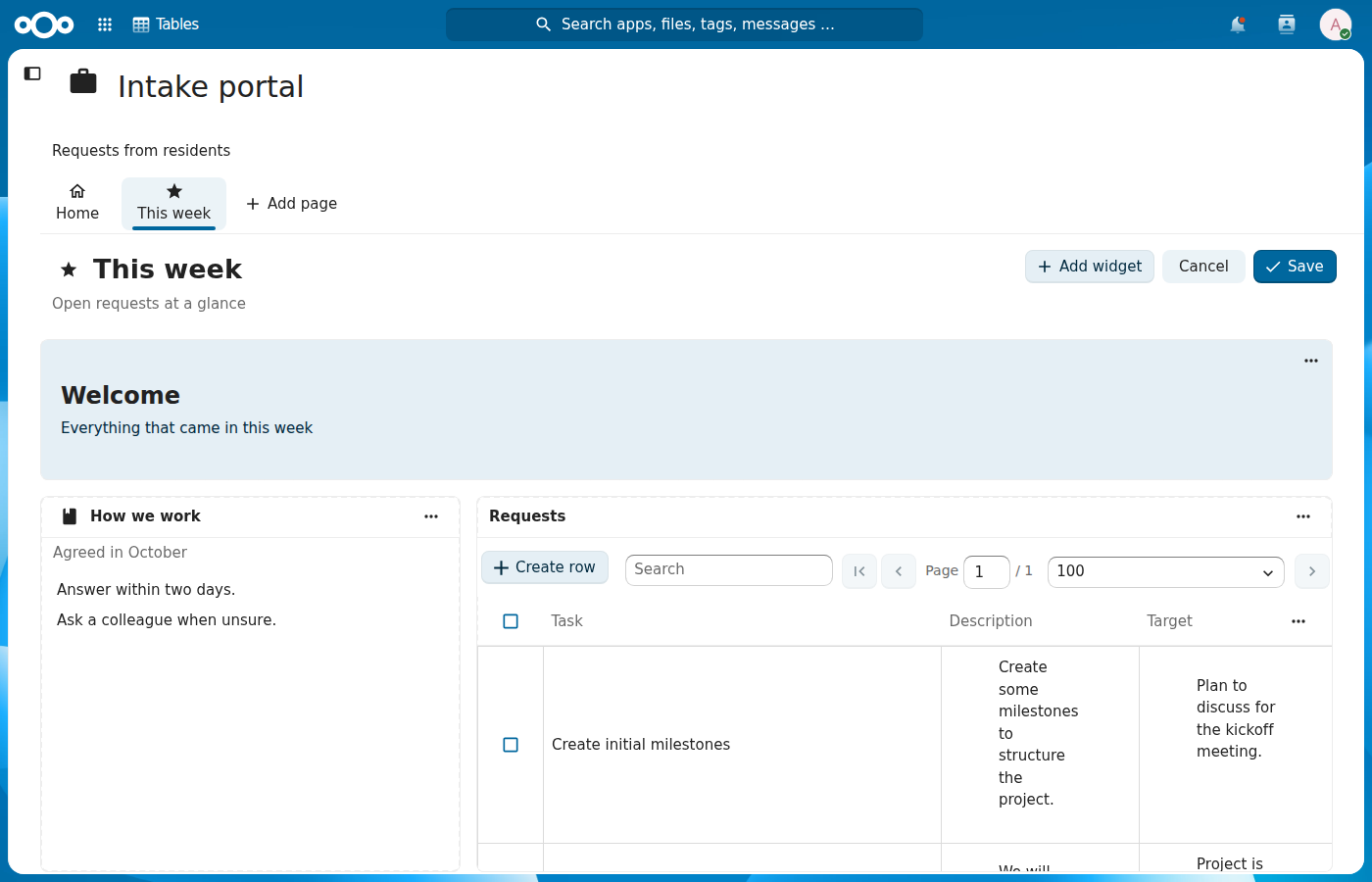
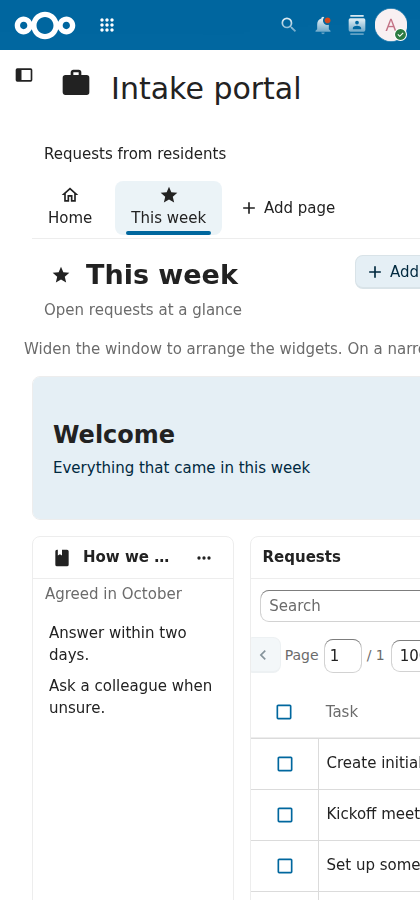
Following @jancborchardt's feedback on #3099: the page tabs look like the NcAppSidebar tabs, the start page is called Home, saving uses the checkmark, "Edit page" sits on the right on every page, and the descriptions line up with the page tabs and the widget texts.
|
1ffea89 to
8b7c073
Compare
8b7c073 to
d64695b
Compare

 AndyScherzinger
left a comment
AndyScherzinger
left a comment
There was a problem hiding this comment.
Review focused on performance, accessibility, security, clean code and architecture. The UI checks ran on a dev instance (MariaDB) with the frontend built from this PR. They covered axe-core 4.14 on the page bar, the add page form and the delete confirmation (no violations), the tabs with the keyboard (arrows, Home, End, Enter), the unsaved-changes prompt (works, focus on "Keep editing"), standalone application mode, page switches with delayed responses, a save with a delayed response, and a 375px wide viewport.
Security: nothing found. Page fields are rendered as text, and the server validates them again.
Already raised on #3213, not repeated here: "Edit row" in a data widget goes to …/page/<id>/row/<rowId>, which no route matches, so the app goes blank; the fix belongs in src/router.js of this PR (a page/:pageId/row/:rowId route, or nested child routes). Also on #3213: a save without loaded widget types drops every data widget's source, Save flattens tabs children, the data widget's export and import scheme actions do nothing, and Edit page / Cancel / Save refetch every data widget.
Cleanup: pagePanelId (Context.vue line 144) is a computed returning a constant, and line 30 builds the 'context-page-tab-' id that ContextPageBar.tabId() already owns.
| if (isStartPage(page)) { | ||
| this.$router.push({ name: 'context', params: { contextId: this.activeContextId } }) | ||
| } else { | ||
| this.$router.push({ name: 'contextPage', params: { contextId: this.activeContextId, pageId: page.id } }) |
There was a problem hiding this comment.
In standalone application mode (/apps/tables/app/<id>, the entry in the Nextcloud header), grid pages can't be opened. This push changes the route, App.vue's route watcher runs routing(), and its loadState('tables', 'contextId') branch replaces the route with /application/<id> on every route change. The tab click lands back on Home, and "Add page" creates the page and then also bounces to Home (line 417). The e2e spec only opens #/application/… URLs, so it doesn't see this. Redirecting only on the initial load, or only when the route leaves /application/<contextId>, fixes it.
Validated: reproduced on a deployed instance (MariaDB, 2.4 data upgraded through #3133 to #3212, frontend built from this PR at d64695b0: /index.php/apps/tables/app/1, click on the "A11Y probe" tab, the URL stays #/application/1, Home stays selected and no grid page is shown).
There was a problem hiding this comment.
You're right, the standalone redirect in App.vue ran on every route change. It now only runs while the route is not on that application, so page tabs, new pages and rows stay where they are. A Playwright test opens an application through /apps/tables/app/<id>, switches to a page and adds one.
cc @blizzz
| async loadActivePage() { | ||
| const pageId = this.activePageId | ||
| this.pageLoading = true | ||
| this.activePage = null |
There was a problem hiding this comment.
Any reload() while a grid page is being edited throws away the draft without the discard prompt. Editing the application (for example adding the table the "Add widget" dialog asks for, through "Edit application") replaces the context in the store, the activeContext watcher sees a new node signature and calls reload(), which sets loading (the whole view becomes a spinner) and then sets activePage = null here. GridPage, which holds draftGrid, unmounts and comes back in view mode. No navigation happens, so the route guards never run. Refreshing in place when the page id hasn't changed (no full-view spinner, keep activePage until the new one arrives), or keeping the draft outside the part reload() replaces, would keep the edit.
Validated: reproduced on a deployed instance (MariaDB, 2.4 data upgraded through #3133 to #3212, frontend built from this PR at d64695b0: Edit page, removed a widget, then replaced the application in the store with one more node, as the store does after "Edit application": the removed widget came back (5 → 6), edit mode was off, no prompt).
There was a problem hiding this comment.
Agreed. A reload of the same application now refreshes it in place, without the full view spinner, and keeps activePage until the page is loaded again, so GridPage keeps its draft. A Playwright test removes a widget in edit mode, adds a table through "Edit application" and checks that edit mode and the removal are still there.
cc @blizzz
| this.saving = false | ||
| // A failed save is already reported by the store | ||
| if (page) { | ||
| this.draftGrid = null |
There was a problem hiding this comment.
Only Save is disabled while saving; Add widget, Cancel, the widget menus and dragging stay active through loadWidgetTypes(), the PATCH and the context reload after it. The PATCH body is built from the draft at line 369, and on success draftGrid = null drops anything changed in the meantime behind a "Page saved" toast, without a prompt. An "Add widget" dialog opened during the save and submitted afterwards throws TypeError: Cannot read properties of null (reading 'widgets') in onWidgetSubmit, and the dialog stays open. Disabling editing while saving, or clearing the draft only if it still equals what was sent, fixes both.
Validated: reproduced on a deployed instance (MariaDB, 2.4 data upgraded through #3133 to #3212, frontend built from this PR at d64695b0: PATCH delayed by 3 s, "Add widget" opened during the save and submitted after it, the TypeError above in the console, dialog still open). The dropped change: code check only (a "Make taller" step during the save didn't apply in the test run, so the loss couldn't be observed).
There was a problem hiding this comment.
Thanks for the reproduction. While a save runs, Add widget, Cancel, the widget menus and the grid are disabled, and the draft is only dropped when it is still the one that was sent. onWidgetSubmit stops when the page cannot be changed, so a late dialog submit no longer throws. A Playwright test holds the PATCH and checks the buttons.
cc @blizzz
| this.loadActivePage() | ||
| } else if (previousPageId !== null) { | ||
| // The start page resources are only loaded while the start page is shown | ||
| this.reload() |
There was a problem hiding this comment.
Every switch from a grid page back to Home runs the full reload(): the whole view, including the title and the page bar, becomes a spinner, the application is fetched again, and each start-page table or view fetches its columns, rows and relations one after the other. resourceViewSettings is reset too, so a filter or sort set on a start-page table is gone after visiting another page. Loading the start-page resources once per application and keeping them, with their view settings, across page switches avoids this.
Validated: reproduced on a deployed instance (MariaDB, 2.4 data upgraded through #3133 to #3212, frontend built from this PR at d64695b0: from page 16 to Home, full-view spinner shown, 10 sequential requests for 2 tables and 1 view: contexts/1, then columns, row and relations per table or view).
There was a problem hiding this comment.
The table list this refers to goes away in #3216, where Home is a grid page like the others and a switch back to it only loads that page, without the full reload or the view settings reset. What is left is that the widgets on Home mount and load again, which you raised on #3216, so I'll handle it there.
cc @blizzz
| :aria-controls="panelId" | ||
| :tabindex="page.id === focusPageId ? 0 : -1" | ||
| :data-cy="page.page_type === PAGE_TYPE_START ? 'contextStartPageLink' : 'contextPageLink'" | ||
| @click="$emit('select', page)"> |
There was a problem hiding this comment.
Activating a tab moves keyboard focus away from the tab bar. The tab is a route change, and App.vue routing() focuses #app-content-vue on every /application/ route change. That code is older, but this PR is what makes page switches route changes, so the fix belongs here: skip the focus move when only pageId changes, and keep focus on the selected tab. For Home it's worse, because reload() (see the comment on Context.vue line 206) replaces the bar with a spinner, which destroys the focused tab.
Validated: reproduced on a deployed instance (MariaDB, 2.4 data upgraded through #3133 to #3212, frontend built from this PR at d64695b0: Enter on a page tab, focus on MAIN#app-content-vue; the same after Enter on Home).
There was a problem hiding this comment.
Agreed. routing() now gets the previous route and skips the focus move when the application stays the same, so focus stays on the tab you activated. A Playwright test checks it for a page tab and for Home.
cc @blizzz
| try { | ||
| confirmed = await showConfirmation({ | ||
| name: t('tables', 'Delete page'), | ||
| text: t('tables', 'Delete the page "{title}" and its widgets? The tables and views stay in the application.', { title: page.title }), |
There was a problem hiding this comment.
t() escapes the title by default and showConfirmation renders the text as text, so Q&A's plan shows as Q&A's plan. { escape: false }, as gridLayout.js already does, fixes it. The confirm button is a primary button, while other delete flows use DialogConfirmation with confirm-class="error"; the destructive styling helps here too. With a page without a title (see the next comment), pageTitle(page) would also avoid the call failing.
Validated: reproduced on a deployed instance (MariaDB, 2.4 data upgraded through #3133 to #3212, frontend built from this PR at d64695b0: page "Q&A's plan", the dialog reads Delete the page "Q&A's plan" …, button button-vue--primary).
There was a problem hiding this comment.
Thanks. The text uses pageTitle(page) with escape: false, and the dialog is built with getDialogBuilder so the confirm button has the error style of the other delete flows. A Playwright test deletes a page called "Q&A's plan" and checks the text.
cc @blizzz
| this.pageLoading = true | ||
| this.activePage = null | ||
| try { | ||
| const page = await this.loadContextPage({ contextId: this.activeContextId, pageId }) |
There was a problem hiding this comment.
The page route also accepts the start page's id: #/application/1/page/<start page id> renders the start page as an editable grid page titled "Home", with Edit page and Delete page, while Home is selected in the bar. Widgets saved there never show on Home, which still renders the table list, and "Delete page" silently does nothing (the title is null, so building the confirmation text fails in the swallowed try). Only a typed or external link gets there, but redirecting to the context route when isStartPage(page) closes it.
Validated: reproduced on a deployed instance (MariaDB, 2.4 data upgraded through #3133 to #3212, frontend built from this PR at d64695b0: #/application/1/page/1, grid page with "Edit page", Delete page opened no dialog and showed nothing).
| } | ||
| return null | ||
| } | ||
| await this.reloadContextQuietly(contextId) |
There was a problem hiding this comment.
Every save waits for a full reload of the application after the PATCH, although the response already is the saved page and a widget save doesn't change the application. Save stays disabled for that extra round trip, and the new context.nodes objects are what makes every data widget refetch (see the #3213 thread on DataWidget.vue). Reloading only when title, icon or technical name changed (the page bar shows those) avoids it.
Validated: reproduced on a deployed instance (MariaDB, 2.4 data upgraded through #3133 to #3212, frontend built from this PR at d64695b0: saving page 16 sent PATCH contexts/1/pages/16 followed by GET contexts/1).
There was a problem hiding this comment.
Agreed. updateContextPage now only reloads the application when the title, icon or description is sent, so a widget save returns the page straight away and the data widgets don't refetch. A Playwright test checks no application GET follows the PATCH.
cc @blizzz
| import { useDataStore } from '../store/data.js' | ||
| import ErrorMessage from '../modules/main/partials/ErrorMessage.vue' | ||
| import ContextPageBar from '../modules/grid/ContextPageBar.vue' | ||
| import GridPage from '../modules/grid/GridPage.vue' |
There was a problem hiding this comment.
This static import puts GridPage, and with it GridStack and the widget components, into the bundle of the application view, so every start page loads it even when the application has no grid pages. defineAsyncComponent(() => import('../modules/grid/GridPage.vue')) loads it with the first grid page.
Validated: code check only.
| }, | ||
| }, | ||
| watch: { | ||
| 'page.id'() { |
There was a problem hiding this comment.
This watcher can't fire: Context.vue keys GridPage by activePage.id, so a different page mounts a new instance.
Validated: code check only.
There was a problem hiding this comment.
You're right, the key already gives each page its own instance. The watcher is gone.
cc @blizzz

d64695b to
0295db4
Compare
0295db4 to
713318b
Compare
713318b to
2cc1768
Compare

|
Hello there, We hope that the review process is going smooth and is helpful for you. We want to ensure your pull request is reviewed to your satisfaction. If you have a moment, our community management team would very much appreciate your feedback on your experience with this PR review process. Your feedback is valuable to us as we continuously strive to improve our community developer experience. Please take a moment to complete our short survey by clicking on the following link: https://cloud.nextcloud.com/apps/forms/s/i9Ago4EQRZ7TWxjfmeEpPkf6 Thank you for contributing to Nextcloud and we hope to hear from you soon! (If you believe you should not receive this message, you can add yourself to the blocklist.) |

2cc1768 to
71b44db
Compare
71b44db to
e0c5ddb
Compare
e0c5ddb to
e9af393
Compare
|
The missing route is in now: Both fair. The panel id is a plain data value now, and the tab id comes from one cc @blizzz |

An application gets a page bar under its description, built as a tab
list: one tab stop, the arrow keys, Home and End move between pages.
Its owner can add grid pages with a title, a named icon, a technical
name and a description, and arrange their widgets in an edit mode that
saves the whole grid through the api/2 page endpoints. Widgets can be
moved and resized from their menu with the keyboard, and unsaved
changes are confirmed before leaving the page.

Assisted-by: ClaudeCode:claude-opus-5-5
Signed-off-by: Ruben van der Linde <ruben@conduction.nl>
…up the texts

The page tabs look like the tabs of NcAppSidebar: an icon above the title, the
selected tab tinted and underlined. The start page of an application is called Home
until it gets a title, like the home of a conversation in Talk. Saving a page uses the
checkmark, and the page actions sit on the right also when the page shows no heading.
The descriptions of the application and of a page line up with the page tabs and the
texts in the widgets.

Assisted-by: ClaudeCode:claude-opus-5-5
Signed-off-by: Ruben van der Linde <ruben@conduction.nl>
The start page still lists its tables here, so they keep their own heading. Only a table
in a widget of a grid page shows its title in the widget.

Assisted-by: ClaudeCode:claude-opus-5-5
Signed-off-by: Ruben van der Linde <ruben@conduction.nl>
A save of the widgets names the version of the page the edit started from, and a
409 tells the editor that someone else saved the page in the meantime. A page
without a title shows its technical name in the page bar instead of an empty tab.

Assisted-by: ClaudeCode:claude-opus-5-5
Signed-off-by: Ruben van der Linde <ruben@conduction.nl>
Assisted-by: ClaudeCode:claude-opus-5-5
Signed-off-by: Ruben van der Linde <ruben@conduction.nl>
"Edit row" in a data widget on a grid page adds /row/<id> to the page route, which
had no match, so the app went blank.

Assisted-by: ClaudeCode:claude-opus-5-5

Signed-off-by: Ruben van der Linde <ruben@conduction.nl>
An application opened through /apps/tables/app/<id> replaced every route with the
application itself, so a page tab or a new page went straight back to the start page.
The redirect now only runs while the route is not on that application.

Assisted-by: ClaudeCode:claude-opus-5-5

Signed-off-by: Ruben van der Linde <ruben@conduction.nl>
The focus moves to the content when another application opens, not when another page
of the same application does.

Assisted-by: ClaudeCode:claude-opus-5-5

Signed-off-by: Ruben van der Linde <ruben@conduction.nl>
Loading the same application again, for example after "Edit application", showed the
full view spinner and dropped the grid page with its draft. It now refreshes in place
and keeps the page shown until it is loaded again.

Assisted-by: ClaudeCode:claude-opus-5-5

Signed-off-by: Ruben van der Linde <ruben@conduction.nl>
A page load that a later one overtook cleared the spinner, so "This page could not
be found" flashed, and still showed its errors. A reload asked for while another
one runs now follows it instead of being dropped.

Assisted-by: ClaudeCode:claude-opus-5-5

Signed-off-by: Ruben van der Linde <ruben@conduction.nl>
Add widget, Cancel, the widget menus and the grid stayed active during a save, so a
change made meanwhile was dropped and a widget dialog submitted after the save threw.
The draft is only cleared when it is still the one that was sent.

Assisted-by: ClaudeCode:claude-opus-5-5

Signed-off-by: Ruben van der Linde <ruben@conduction.nl>
Edit page, Cancel, Save, removing a widget and closing the widget dialog removed the
button or menu item that had the focus, so it fell to the page. The focus now goes to
the button that takes its place: Add widget, Edit page, the next widget's actions, or
the actions of the widget that was configured or added.

Assisted-by: ClaudeCode:claude-opus-5-5

Signed-off-by: Ruben van der Linde <ruben@conduction.nl>
The whole application view took the width of its widest content, so the page bar
never wrapped and a grid page measured more columns than a phone has. Only the table
list of the start page grows wider now.

Assisted-by: ClaudeCode:claude-opus-5-5

Signed-off-by: Ruben van der Linde <ruben@conduction.nl>
The page form submits as a form now, so Enter adds the page, and its button is
disabled while the page is being added or saved, so a double click no longer adds
two pages.

Assisted-by: ClaudeCode:claude-opus-5-5

Signed-off-by: Ruben van der Linde <ruben@conduction.nl>
Assisted-by: ClaudeCode:claude-opus-5-5

Signed-off-by: Ruben van der Linde <ruben@conduction.nl>
The confirmation escaped the title, so Q&A's plan showed as Q&A's plan. It
names a page without a title as the page bar does, and its confirm button has the
destructive style of the other delete dialogs.

Assisted-by: ClaudeCode:claude-opus-5-5

Signed-off-by: Ruben van der Linde <ruben@conduction.nl>
…n again

A save of the widgets waited for a full load of the application, and the new nodes
made every data widget fetch its rows again. The application is now loaded again only
when the title, icon, technical name or description of the page changed.

Assisted-by: ClaudeCode:claude-opus-5-5

Signed-off-by: Ruben van der Linde <ruben@conduction.nl>
Each page gets its own GridPage instance through its key, so the page of an instance
never changes.

Assisted-by: ClaudeCode:claude-opus-5-5

Signed-off-by: Ruben van der Linde <ruben@conduction.nl>
The page bar and the page panel take the id of a tab from pageTabId(), and the panel
id is a plain value instead of a computed.

Assisted-by: ClaudeCode:claude-opus-5-5

Signed-off-by: Ruben van der Linde <ruben@conduction.nl>
The widget menu is called "Actions for <label>" since #3213.

Assisted-by: ClaudeCode:claude-opus-5-5

Signed-off-by: Ruben van der Linde <ruben@conduction.nl>
The page form asks for a slug only for a new page and shows the slug of a
page being edited read only, and never sends it with an edit, as the server
keeps it. The check of a typed slug uses isTechnicalNameValid.

Assisted-by: ClaudeCode:claude-opus-5-5
Signed-off-by: Ruben van der Linde <ruben@conduction.nl>
e9af393 to
101ff07
Compare


Part of #3099, on top of #3214 (widget dialog). An application gets a page bar under its description, and the people who manage it can add grid pages and arrange widgets on them. The start page still lists its tables and views as before; #3216 shows it as a grid page too.
Size: 1453 lines: 1094 code and 359 tests.
What changes
tablistwith one tab stop, the arrow keys, Home and End move between tabs, Enter or Space opens one, and each tab hasaria-selectedandaria-controlspointing at the page panel, which is labelled by its tab. In a right-to-left language the arrow keys follow the reading direction.page_<number>form the server keeps for itself. Without one the page getspage_<id>.PATCH /api/2/contexts/{contextId}/pages/{pageId}, Cancel drops every change, and leaving the page or closing the tab with unsaved changes asks first./application/{contextId}/page/{pageId}opens a grid page.Where else applications show up
Applications and their pages have no public share page, and the Smart Picker and reference widgets only cover tables and views, so there's nothing to wire up there.
How it was tested
On Nextcloud 34 with PostgreSQL:
context-grid-pages.spec.ts: adding a page with a title, icon, technical name and description, adding a header and a table widget and finding them after a reload, Cancel drops changes, a sharee sees the page read-only and gets a 403 on PATCH, a table removed from the application leaves its widget asking for a new one, and moving and resizing a widget from its menuContextPageBar.cy.js(order, one tab stop, arrow keys, Home and End, add only for managers) andContextPageForm.cy.js(technical name checks, keeping an automatic name)npm run lint,npm run stylelintandnpm run build🖼️ Screenshots
🏁 Checklist
/backport to stableX.X🤖 AI (if applicable)