Repository navigation
feat(pages): add the grid canvas and its widgets - #3213
rubenvdlinde wants to merge 7 commits into
Conversation


fe08042 to
4be217b
Compare

|
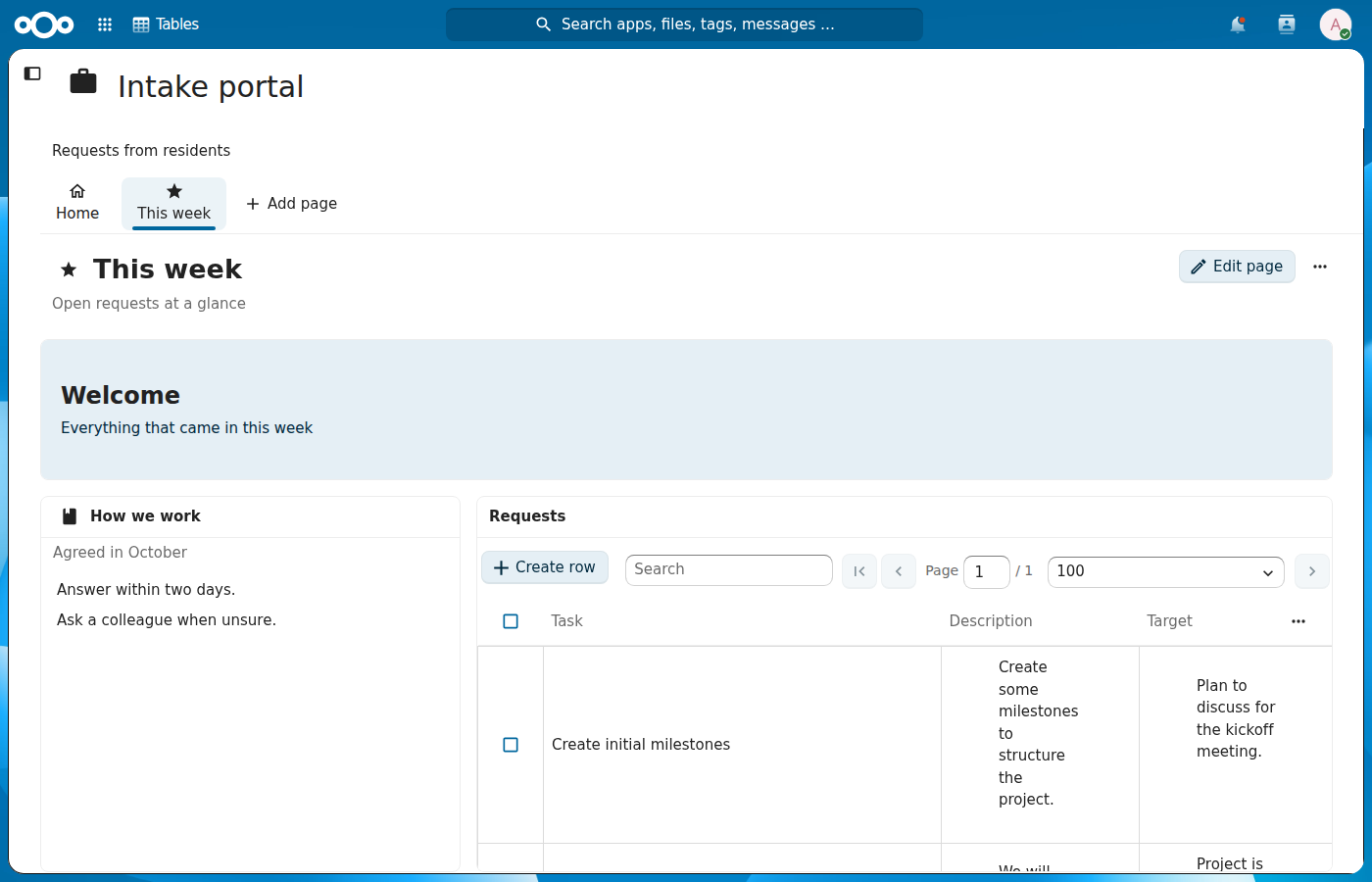
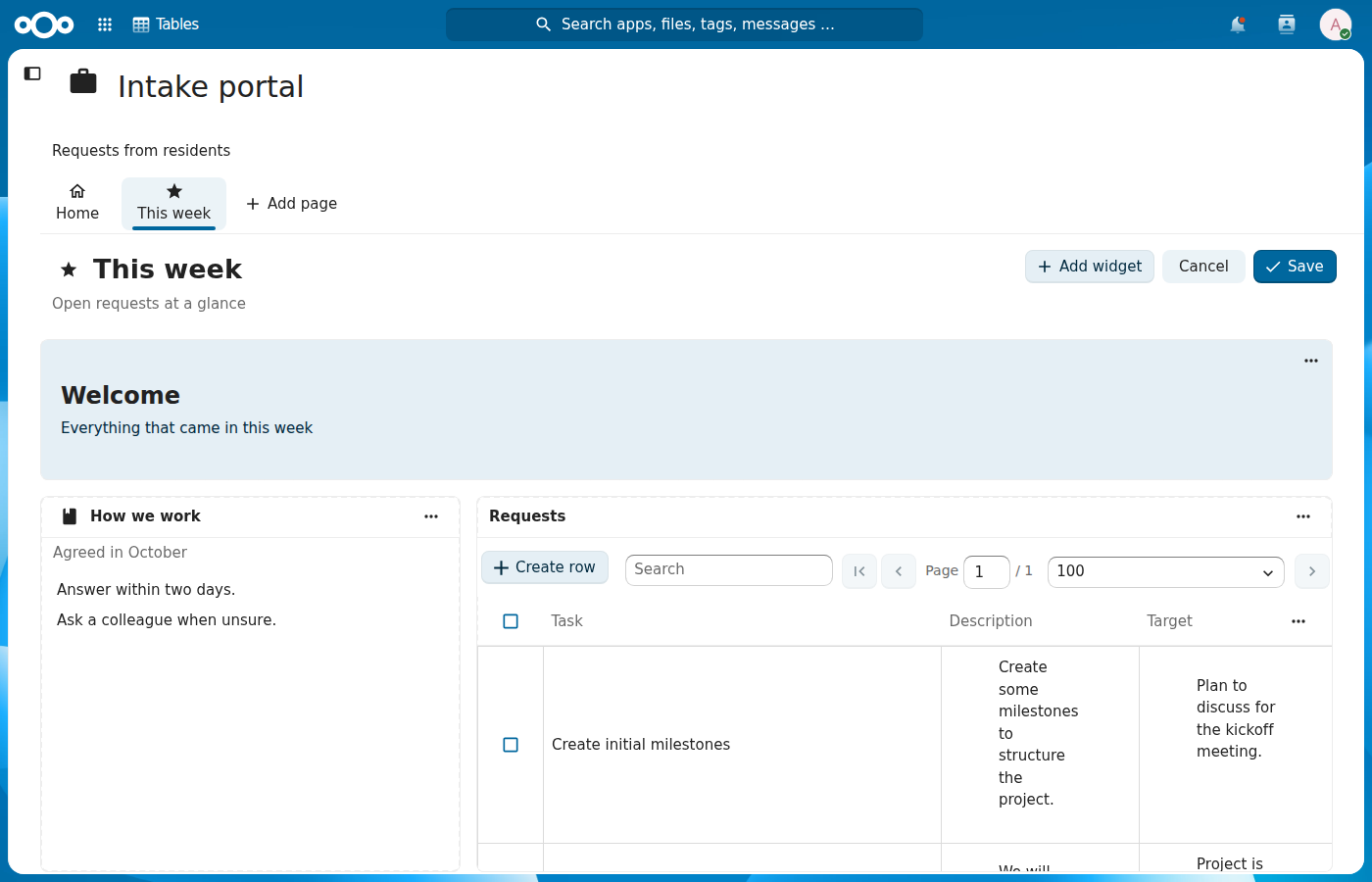
Following @jancborchardt's feedback on #3099: a table widget shows its title once, a widget keeps the same size in view and edit mode, and the edit mode outline uses
|
4be217b to
0d87be1
Compare
0d87be1 to
bdafa33
Compare

 AndyScherzinger
left a comment
AndyScherzinger
left a comment
There was a problem hiding this comment.
Review focused on performance, accessibility, security, clean code and architecture. This PR has no screen of its own, so the UI checks ran on a dev instance (MariaDB) with the frontend built from #3215, whose copies of the files in this PR only differ in GridWidget.vue's heading level. They covered axe-core 4.14 on a grid page in view mode, edit mode and at 700px, the widget menu with the keyboard only, prefers-reduced-motion, and the header colours. The data widget renders the existing table grid, which has axe failures of its own on every table page; those aren't from this PR and aren't listed here.
Widgets in tabs lose their tab on save until #3217: pageToGrid() keeps neither parentId nor parentTab, so saving a page that has a tabs widget (the type is on the server since #3212) sends its children without parentIndex, and saveParents() writes parent_id = NULL. #3217 adds both fields, so this only matters if #3213 to #3216 ship in a release without #3217. Validated: reproduced on a deployed instance (MariaDB, 2.4 data upgraded through #3133 to #3212, frontend built from #3215 at d64695b0 because nothing in this PR mounts the grid yet; these files there match this PR except the heading level in GridWidget.vue: a page with a tabs widget and a text widget in its second tab, Edit page and Save without changes, parent_id of the text widget went from the tabs widget to NULL).
Security: nothing found. Colours pass a hex check before :style, alignment is whitelisted, all text is interpolated, NamedIcon only loads the bundled material icons.
CI: Playwright (master) fails "Manage a context › Remove context resource" on both attempts. This PR doesn't touch that flow, and the test passes on stable33 to stable35 and on #3212, so a rerun is worth a try before looking further.
| {{ t('tables', 'This table or view could not be loaded') }} | ||
| </p> | ||
| <template v-else> | ||
| <CustomView v-if="isView" |
There was a problem hiding this comment.
The table and view components bring the start page's row editing along, but they navigate relative to the current route: EditRow pushes route.path + '/row/' + id. On a grid page that is /application/1/page/16/row/1, which no route matches (#3215 only adds /application/:contextId/row/:rowId), so clicking "Edit row" in a data widget empties the whole app content: the page, the grid and the dialog that was opening are all gone. Either #3215 adds a page/:pageId/row/:rowId child, or the data widget handles edit-row itself and opens the dialog without a route change.
Validated: reproduced on a deployed instance (MariaDB, 2.4 data upgraded through #3133 to #3212, frontend built from #3215 at d64695b0 because nothing in this PR mounts the grid yet; these files there match this PR except the heading level in GridWidget.vue: row menu → Edit row in a data widget, the URL became #/application/1/page/16/row/1 and neither the grid page nor a dialog was rendered).
There was a problem hiding this comment.
Thanks, that blanked the whole page. #3213 has no grid page route of its own yet, the routes for grid pages arrive in #3215, so the fix is there: "fix(pages): route a row opened on a grid page" adds /application/:contextId/page/:pageId/row/:rowId, so Edit row on a grid page opens the row over the page.
cc @blizzz
| this.grid.removeWidget(node.el, false, false) | ||
| } else if (isFullWidth && (node.x !== item.gridX || node.y !== item.gridY || node.w !== item.gridWidth || node.h !== item.gridHeight)) { | ||
| // A move from the widget menu rather than a drag | ||
| this.grid.update(node.el, { x: item.gridX, y: item.gridY, w: item.gridWidth, h: item.gridHeight }) |
There was a problem hiding this comment.
Applying the new layout one update() per node breaks the keyboard steps whenever the target overlaps a neighbour. update() on the moved widget pushes the neighbour down; the loop then puts the neighbour back to its old position, which pushes the moved widget down in turn, and so on. The final positions come back through change → layout-change, so the draft takes them over. On a page with two half-width widgets side by side, "Move right" on the left one sent it to row 11, below every other widget, instead of overlapping its neighbour by one column or swapping. "Make wider" next to a neighbour does the same.
Wrapping the loop in batchUpdate() doesn't help; loading the target layout in one go (grid.load(items, false)) and emitting the engine's resulting positions does.
Validated: reproduced on a deployed instance (MariaDB, 2.4 data upgraded through #3133 to #3212, frontend built from #3215 at d64695b0 because nothing in this PR mounts the grid yet; these files there match this PR except the heading level in GridWidget.vue: widgets at (0,2,w6) and (6,2,w6), Move right on the first, which ended at (1,11)).
There was a problem hiding this comment.
You're right, per node updates fought each other. A step from the menu now loads the whole layout into GridStack with one grid.load() and emits the positions GridStack settles on, so a neighbour is pushed aside instead of the widget jumping down. There's a component test with two half-width widgets side by side.
cc @blizzz
| if (widget.id) { | ||
| saved.id = widget.id | ||
| } | ||
| if (findWidgetType(widgetTypes, widget.type)?.hasSource) { |
There was a problem hiding this comment.
source is only sent when the widget types are loaded and say the type has one. loadWidgetTypes() swallows a failed request (only a toast), so a save made while the types aren't there sends every data widget without source, readWidget() reads that as null, and syncPage() deletes each widget's link: all table widgets on the page show "No table or view to show" afterwards, and the save looked successful. The server accepts source: null for every type, so saved.source = widget.nodeRelId ? { nodeRelId: widget.nodeRelId } : null without the type lookup removes the dependency. #3217 keeps the same lookup.
Validated: reproduced on a deployed instance (MariaDB, 2.4 data upgraded through #3133 to #3212, frontend built from #3215 at d64695b0 because nothing in this PR mounts the grid yet; these files there match this PR except the heading level in GridWidget.vue: /api/2/widget-types answered 503, Edit page and Save without changes; the data widget's row in oc_tables_contexts_widget_source was deleted and no error was shown).
There was a problem hiding this comment.
Agreed, a failed types request shouldn't be able to unlink tables. gridToWidgets() now sends source from the widget's own node relation for every widget, null when it has none, and no longer takes the widget types. A test saves with no types loaded and keeps the table.
cc @blizzz
| }, | ||
| watch: { | ||
| target: { | ||
| deep: true, |
There was a problem hiding this comment.
componentProps in GridWidget builds a new {type, id} object on every render, and Edit page / Cancel / Save replace the widgets with copies, so this deep watcher sees a "new" target every time and reloads. Each data widget then swaps the table for a spinner and fetches its columns and all rows again, losing scroll position and selection. Watching a primitive key (target ? target.type + ':' + target.id : null) keeps it to real changes. While here: load() awaits columns, rows and relations one after the other; the three requests don't depend on each other, so Promise.all() saves two round trips per widget.
Validated: reproduced on a deployed instance (MariaDB, 2.4 data upgraded through #3133 to #3212, frontend built from #3215 at d64695b0 because nothing in this PR mounts the grid yet; these files there match this PR except the heading level in GridWidget.vue: Edit page triggered GET api/1/tables/1/columns and GET row/table/1 again, Cancel triggered both a third time).
There was a problem hiding this comment.
The widget now watches a type:id key instead of the target object, so Edit page, Cancel and Save no longer reload the table, and columns, rows and relations load in parallel. A component test toggles edit mode and checks the columns and rows are requested once.
cc @blizzz
| :rows="rows" | ||
| :view-setting="viewSetting" | ||
| @create-column="createColumn" | ||
| @import="openImportModal" |
There was a problem hiding this comment.
Only create-column and import are wired up. TableWrapper and View also emit download-csv, download-filtered-csv, show-integration, toggle-share and (tables only) import-scheme, so the CSV exports, "Import scheme" and the integration and share actions show up in a data widget and do nothing. Context.vue handles them for the start page (with validateExportAccess); either the same handlers here, or showOptions/a prop that hides those actions in a widget.
Validated: code check only.
There was a problem hiding this comment.
All table actions work in a widget now. The CSV exports check access the same way as the start page, Import scheme opens its dialog, and Share and Integration make the shown table or view the active element and open that sidebar tab. A component test checks the sidebar events.
cc @blizzz
| <template> | ||
| <section class="grid-widget" | ||
| :aria-labelledby="hasHeading ? headingId : undefined" | ||
| :aria-label="hasHeading ? undefined : label" |
There was a problem hiding this comment.
Every widget without a title becomes a region landmark named after its type, so a page with two header widgets or two text widgets has landmarks with identical names ("Header", "Header", "Description", "Description"), which axe reports as landmark-unique. A header widget is labelled "Header" although it shows its own heading. Without a title a plain div (no landmark) would be quieter; or label header widgets by their heading.
Validated: reproduced on a deployed instance (MariaDB, 2.4 data upgraded through #3133 to #3212, frontend built from #3215 at d64695b0 because nothing in this PR mounts the grid yet; these files there match this PR except the heading level in GridWidget.vue: axe landmark-unique on section[aria-label="Header"] and section[aria-label="Description"] in view mode, edit mode and at 700px).
There was a problem hiding this comment.
A widget without a title is now a plain div instead of a region named after its type, so two header or text widgets no longer give duplicate landmarks. Widgets with a title stay regions labelled by their heading. There's a test for both.
cc @blizzz
| cellHeight: GRID_CELL_HEIGHT, | ||
| margin: GRID_MARGIN, | ||
| float: true, | ||
| animate: true, |
There was a problem hiding this comment.
animate: true ignores prefers-reduced-motion: the items keep their 0.3s transitions, so every reflow on resize animates. animate: !window.matchMedia('(prefers-reduced-motion: reduce)').matches (or a CSS rule that drops the transition under the media query) respects it. Separately, the :class binding on the GridStack root replaces the class list on the first edit toggle and drops grid-stack-animate, so in edit mode nothing animates at all; wrapping the grid-stack element in a div that carries the editing class avoids that.
Validated: reproduced on a deployed instance (MariaDB, 2.4 data upgraded through #3133 to #3212, frontend built from #3215 at d64695b0 because nothing in this PR mounts the grid yet; these files there match this PR except the heading level in GridWidget.vue: Chromium with reducedMotion: 'reduce', .grid-stack-item transition 0.3s in view mode; after Edit page, grid-stack-animate was gone from the root).
There was a problem hiding this comment.
GridStack now only animates when the user hasn't asked for reduced motion, and the editing class moved to the canvas wrapper, so Vue no longer overwrites the classes GridStack puts on its root. Component tests check grid-stack-animate survives edit mode and is off with reduced motion.
cc @blizzz
| this.minWidth = GRID_MIN_WIDTH | ||
| }, | ||
| mounted() { | ||
| this.grid = GridStack.init({ |
There was a problem hiding this comment.
No rtl option: GridStack's default 'auto' only checks the grid element's inline style.direction (gridstack.js line 233), not the page direction, so in Arabic or Hebrew the grid isn't mirrored while the widgets' own content is, and the DOM (and so the Tab order) runs left to right. rtl: isRTL() from @nextcloud/l10n fixes it; "Move left/right" in GridWidget would then need to swap their gridX sign as well.
Validated: code check only (setting a Hebrew language on the dev instance didn't switch it to RTL).
There was a problem hiding this comment.
GridStack now gets rtl: isRTL(), and in a right-to-left language Move left and Move right swap, including which one is disabled at the edge, so the steps follow what the user sees. Both have a test.
cc @blizzz
| } | ||
| const columns = columnsForWidth(width) | ||
| if (this.grid.getColumn() !== columns) { | ||
| this.grid.column(columns, 'moveScale') |
There was a problem hiding this comment.
Changes to layout while the canvas shows 6 or 1 columns are skipped by syncGridItems() (isFullWidth), and widening only calls grid.column(12), which restores GridStack's own cached 12-column layout and fires no change. So the grid and the layout prop drift apart: cancel an edit while the navigation is open (6 columns), close the navigation, and view mode shows the cancelled arrangement until a reload. Re-applying layout after switching back to 12 columns (grid.load() with the prop) keeps them in step.
Validated: code check only, plus a standalone GridStack 13.3.0 page in Chromium (not on the instance).
There was a problem hiding this comment.
When the canvas goes back to 12 columns the layout prop is loaded into GridStack again instead of its own cache, so a change made while the canvas was narrower, like a cancelled edit, shows up. A component test changes the layout at 800px and widens to 1400px.
cc @blizzz
| }) | ||
|
|
||
| cy.get('[data-cy="gridWidget"] h2').should('contain.text', '✅ Tasks') | ||
| cy.get('[data-cy="gridWidget"] h1').should('not.exist') |
There was a problem hiding this comment.
This passes before the table has rendered, so it can't catch the title coming back. Waiting for the table first (for example cy.get('[data-cy="gridWidget"] table').should('exist')) makes it meaningful.
Validated: code check only.
There was a problem hiding this comment.
Right, with the 404 the table never rendered. The test now stubs the columns and rows, waits for the row to show up in the table, and only then checks there's no second title.
cc @blizzz
bdafa33 to
dd35d28
Compare
dd35d28 to
f6e0811
Compare
f6e0811 to
ab7419f
Compare

|
Hello there, We hope that the review process is going smooth and is helpful for you. We want to ensure your pull request is reviewed to your satisfaction. If you have a moment, our community management team would very much appreciate your feedback on your experience with this PR review process. Your feedback is valuable to us as we continuously strive to improve our community developer experience. Please take a moment to complete our short survey by clicking on the following link: https://cloud.nextcloud.com/apps/forms/s/i9Ago4EQRZ7TWxjfmeEpPkf6 Thank you for contributing to Nextcloud and we hope to hear from you soon! (If you believe you should not receive this message, you can add yourself to the blocklist.) |

ab7419f to
6f5309b
Compare
6f5309b to
9fa64f2
Compare
9fa64f2 to
5477912
Compare
The widget menu is called "Actions for <label>" since #3213.

Assisted-by: ClaudeCode:claude-opus-5-5

Signed-off-by: Ruben van der Linde <ruben@conduction.nl>
|
Agreed. #3213 to #3217 should land in one release, and I'll say that in the descriptions. With the #3212 changes, #3217 will send Thanks for checking it on the other branches. I'll rerun it after the next push and look further only if it fails again. cc @blizzz |

A grid page shows widgets on a 12 column GridStack canvas: a header, a
text and a table or view. Widgets carry an optional named icon and
description next to their title. In edit mode widgets can be dragged
and resized, and moved and resized from their menu with a keyboard. On
a narrower screen the grid reflows to 6 columns or one, and that reflow
is never saved.

Assisted-by: ClaudeCode:claude-opus-5-5
Signed-off-by: Ruben van der Linde <ruben@conduction.nl>
…tle once

A data widget without a title of its own takes the title of its table or view, and the
table or view inside it no longer repeats it. A widget without a title gets no header in
edit mode either: its menu floats over it, so switching edit mode no longer moves the
widgets. The edit mode outline uses the regular border colour.

Assisted-by: ClaudeCode:claude-opus-5-5
Signed-off-by: Ruben van der Linde <ruben@conduction.nl>
The tables widget shows every table and view of the application one below the
other, as the start page did before it became a grid page, so rows stay
editable there and access through the application keeps working. A header
takes the color pair of the theme it names; the free hex colors and their
check go.

Assisted-by: ClaudeCode:claude-opus-5-5
Signed-off-by: Ruben van der Linde <ruben@conduction.nl>
…'s root classes

A move from the widget menu loads the whole layout into GridStack at once,
so widgets no longer push each other on the way, and the positions GridStack
settles on are emitted. When the canvas widens back to 12 columns the layout
prop is loaded again instead of GridStack's cache. The editing class moves to
the canvas wrapper, so Vue no longer drops grid-stack-animate, animation
follows prefers-reduced-motion and the grid is mirrored in a right-to-left
language.

Assisted-by: ClaudeCode:claude-opus-5-5

Signed-off-by: Ruben van der Linde <ruben@conduction.nl>
gridToWidgets() only sent source for types the loaded widget types marked
as having one, so a save after a failed widget types request sent data
widgets without source and the server unlinked their tables. The source
now comes from the widget's own node relation, null when it has none,
which the server accepts for every type.

Assisted-by: ClaudeCode:claude-opus-5-5

Signed-off-by: Ruben van der Linde <ruben@conduction.nl>
…ry table action

The widget watches a type:id key of its target instead of the object the
card builds on every render, so edit mode no longer reloads it, and it
loads columns, rows and relations in parallel. It starts in the saved
sorting of its table or view, starts over when it points somewhere else,
and reloads when the shown view is saved with new filters or columns.

CSV exports, Import scheme, Share and Integration are handled: the
exports check access as the start page does, and the sidebar tabs open for
the shown table or view. The table sizes itself from a
--app-content-width of the widget, and the sticky options and head only
move up when the title row of the table is not rendered.

Assisted-by: ClaudeCode:claude-opus-5-5

Signed-off-by: Ruben van der Linde <ruben@conduction.nl>
…icate landmarks

The widget menu is named "Actions for {label}". After a move or resize from
the menu, focus stays on that step, so Enter repeats it, and a polite live
region reads out the new column, row and size. Move left and Move right
follow the mirrored grid in a right-to-left language. A widget without a
title is a plain div instead of a region named after its type, a widget
description keeps its line breaks, and a header heading takes the text
color of its color pair.

Assisted-by: ClaudeCode:claude-opus-5-5

Signed-off-by: Ruben van der Linde <ruben@conduction.nl>
5477912 to
70707d2
Compare
The widget menu is called "Actions for <label>" since #3213.

Assisted-by: ClaudeCode:claude-opus-5-5

Signed-off-by: Ruben van der Linde <ruben@conduction.nl>


Part of #3099, on top of #3212 (tabs model). The first frontend pull request for grid pages: the canvas and the four widgets that render on it. Nothing uses them yet; #3214 adds the dialog to add and configure widgets and #3215 puts the grid on a page. The whole stack is listed in #3211. None of it needs the menu (#3135 to #3138).
Size: 1313 lines: 1082 code (17 of them in
package-lock.json) and 231 tests.What changes
start,centerorend, and one colour pair of the theme), a text, a table or view, and all tables and views of the application. The table or view widget shows the rows with the same components as the start page, and only tables and views of its own application; the tables widget shows each of them that way, one below the other. A widget of a type this frontend can't render says so instead of failing.NamedIconshows an icon by name, and pages and menu items can use it too.GET /api/2/widget-typesonce, shared by all widgets that mount together; the card uses them for its type label.How it was tested
GridCanvas.cy.js(placing widgets, edit mode on a wide and a narrow screen, a widget added later),GridWidget.cy.js(title, icon, description, header alignment and colour, the empty states of a data widget, the tables widget, moving from the menu) andgridLayout.cy.js(reading a page into a grid and saving it back, including icon and description)npm run lint,npm run stylelintandnpm run build🖼️ Screenshots
No screen yet: #3215 puts the grid on a page, its pull request has the screenshots.
🏁 Checklist
/backport to stableX.X🤖 AI (if applicable)